I’ll be honest: I don’t like general marketing statements.
You know the ones. I cringe a little bit when I hear “know, like, and trust.”
The problem is that these are too flimsy. They’re not actionable or instructive. And they very rarely come with cold-hard data behind it.
Turns out, though, that there’s a little truth in this one.
People do like to buy from people they know. Or, maybe more accurately, who know them.
Here’s what I mean.
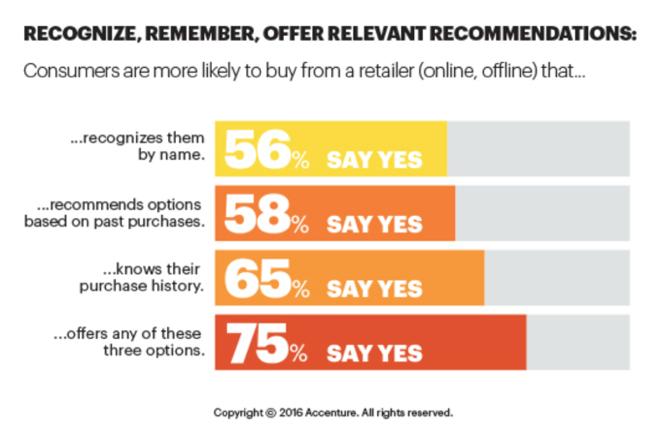
Accenture recently released data that shows that three-fourths of customers want to purchase from companies that:
- Knows them by name
- Remembers their past purchases
- Recalls their purchasing history
It’s no wonder that by 2020, Gartner is predicting ‘smart personalization engines’ will increase profits 15%.
What, exactly, does that mean?
It means a company will be able to understand what buyers are looking for and give it to them in real-time.
This is why personalization is such a big deal.
Not only do customers prefer it. But it can also get them to buy more, more often.
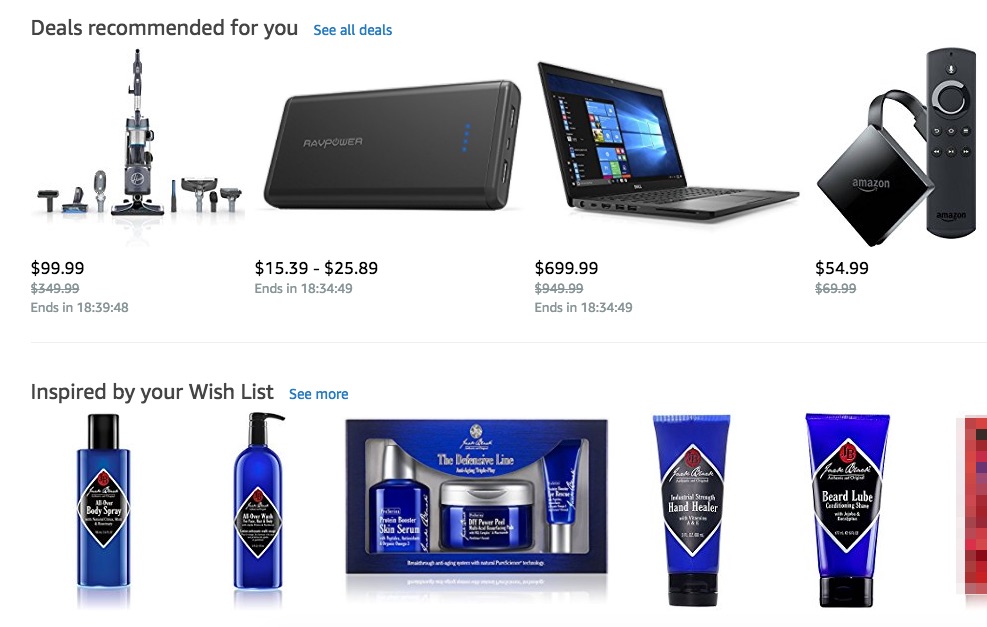
Go login to Amazon to see this for yourself.
What’s the first thing you see, straight away on their homepage?
- Deals recommended for you
- And products inspired by your Wish List
In almost every study you can find, personalization has the power to increase conversions across the board.
At Home in The Country added Amazon-like product recommendations and increased revenue 13%.
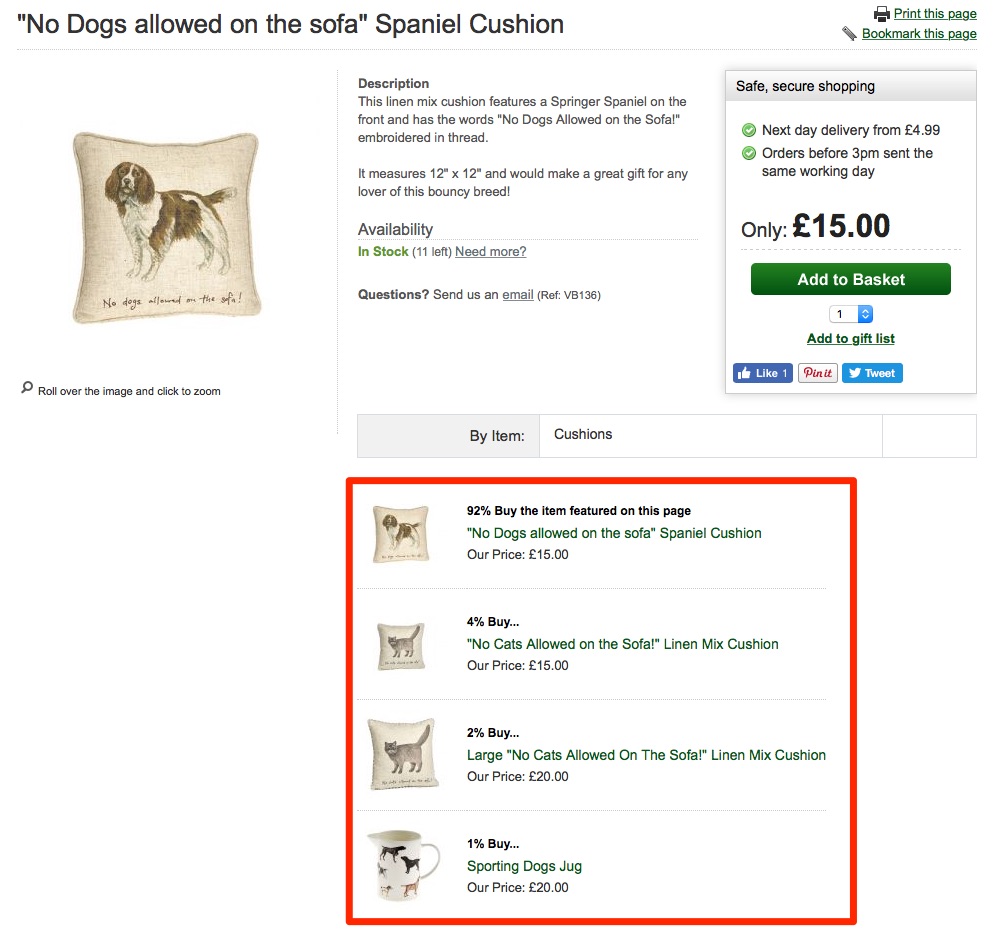
Personalizing your marketing is almost guaranteed to increase results.
I say “almost,” because most companies still struggle with actually doing it.
On the one hand, 77% of them will agree that it’s crucial. While on the other, 60% struggle with implementing it.
Fortunately, I’ve learned a few tricks over the years.
And I’m going to share them all with you in this article.
But there’s one thing you need to realize, first.
Personalization starts with collecting data.
You need to know more about current customers before you can ever serve them personalized content or messages.
So let’s begin there, with a few simple places to start.
- Track Pageviews
- Overlays
- Survey Responses
- Link Clicks
- Ad Campaign Interaction
- Tag and Filter Results
- Smart Lists
- Location Data
- Dynamic Content Blocks
- Referral Source
1. Track Pageviews
Customer surveys are important.
Getting qualitative data can help you figure out exactly what people are struggling with, in their own words.
It’s one of the best places to uncover customer habits or preferences.
And we will cover survey-based information in a minute.
But you can rarely start with surveys.
The problem is convenience. Surveys might take a few minutes to complete.
However, if someone doesn’t know who you are, they’re never going to agree to a survey.
They’re not going to take time out of their busy schedule because there’s nothing in it for them.
That means you need a different approach initially.
One of my go-to techniques to begin with is to simply tailor messaging based on the page someone is on.
You can also use past pageview history to help personalize messaging, too. I’ll show you how to do this with a few tools later on.
But let’s keep it simple for now.
Someone came to your site and is now looking at your product page. They’re trying to check out the features to see how it can help them.
Check out how Drift did this recently when I visited their features page:

The main headline on the page talked about “Automating your sales funnel with Playbooks.”
They’re trying to promote one of their features that can help companies replace steps in their sales process with bots to automatically book sales meetings for them.
Then, guess what the on-page message said?
It reiterated the same message.
“Drift Helps thousands of businesses book more sales meetings with bots…”
The call to action was perfectly aligned with the page content.
This is like ‘message match’ in advertising, where you match the same value props from an ad someone clicks to the landing page people see next.
See how simple that is?
You should already know what content or messaging is on each page.
So it’s fair to assume that people visiting that page will be interested in it, too.
OK, that was an easy one. Let’s see the same underlying tactic, applied to a new CTA.
2. Overlays
Admittedly, pop-up overlays are annoying.
I don’t love them as a visitor, either.
And yet, I still use them. All the time.
Why?
Because they work.
Check out this quote from Bryan Harris from Videofruit:
“We did in-depth analysis of our revenue last year and found pop-up, welcome mat and slide box opt-in subs accounted for just over $250,000 in revenue.”
When there’s a quarter of a million on the line, of course you’ll use an overlay, too.
The trick is to treat overlays like ads.
Why don’t people like banner ads? Because they’re irrelevant.
They’re advertising products or services that you could care less about.
The trick, again, is message match.
You infer what people want by looking at the pages they’re visiting.
Let’s take a blog as an example. You might have thousands of posts on your site.
There’s no way you can customize unique overlay messages for each one.
Instead, use the blog post category as a guide.
Authority Hacker used OptinMonster to target both category and post tags. They created new offers that perfectly lined up with the content in each of those blog posts.
So the “juicing” category, for example, had a juicing-related ebook offered:
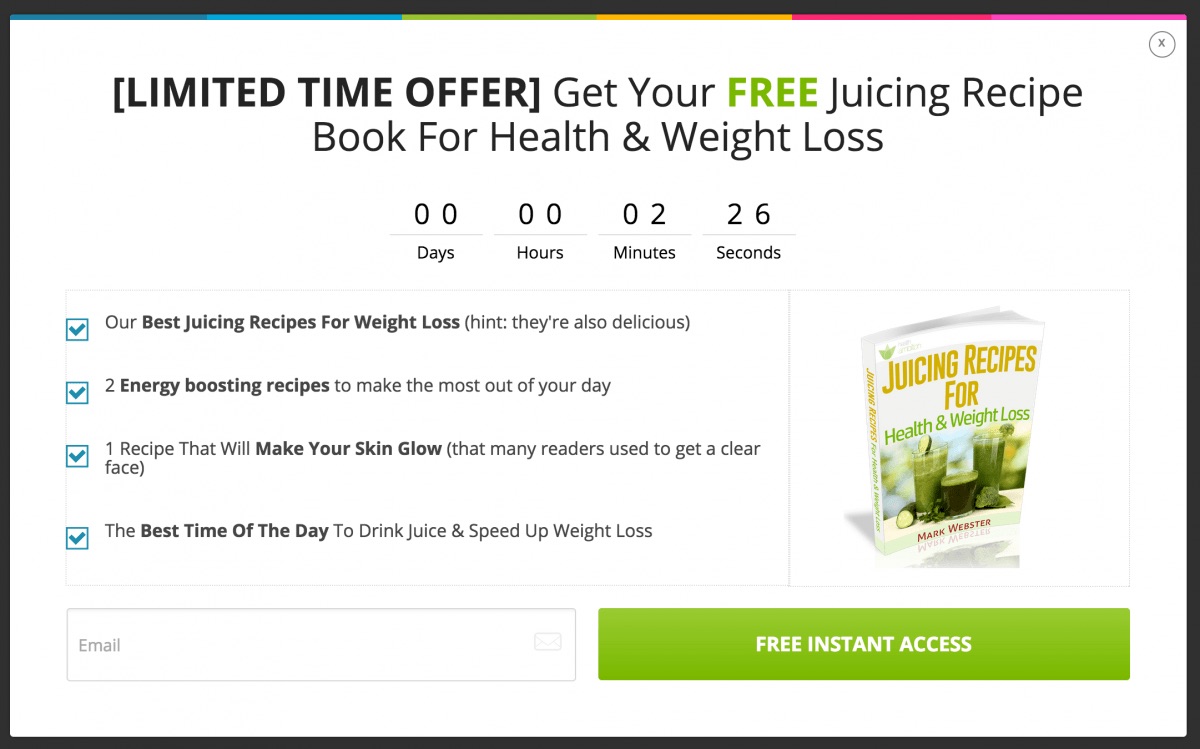
Simple, right?
And what do you know — the conversion rate for this single pop-up was well over 4%.
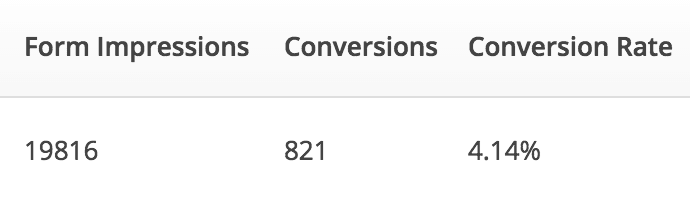
I’ll show you some advanced personalization techniques in a few moments.
But you can already see that implementing personalization, at least on a small scale, isn’t too challenging.
Chances are, you’re already running campaigns like these.
The trick is to look at how you can make them more relevant to the people already visiting.
The fastest ways to increase results is to start with low-hanging fruit. And that’s the current audience you already have.
3. Survey Responses
Customer surveys only become useful once you have a sizeable audience and database.
Math is the problem.
First, response rates tend to be pretty low.
Some surveys, like Net Promoter Scores (NPS) will be a little higher than most. But you’re still only looking at responses from a fraction of the list.
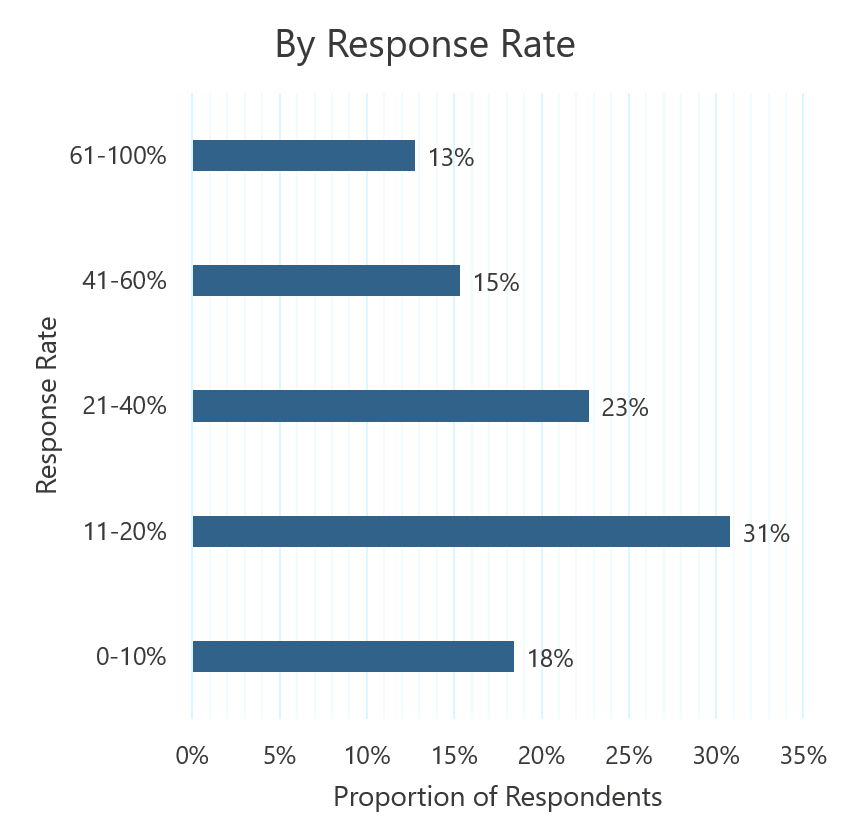
The second problem is statistical significant and the third is confidence level.
In other words, you run the risk of making bad decisions based on incomplete information.
So you typically need to run your results through a calculation, like this one from Genroe, to make sure your sample size is large enough.
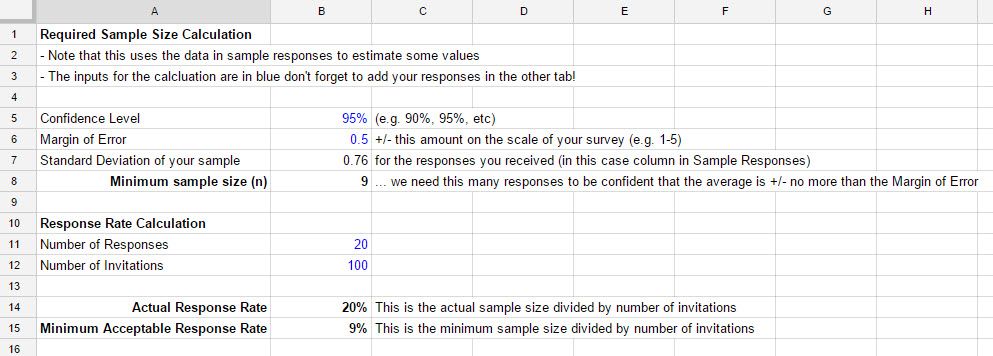
But once you jump through all of these hurdles, customer surveys can be gold.
Not only for general business or marketing campaigns, but for better personalizing results for them, too.
Here, I’ll show you what I mean.
You need to connect whatever survey tool you use back with a CRM or marketing automation platform.
Personally, I like Typeform and Gravity Forms, depending on what you’re using them for.
Both have solid integrations right out of the box. That means you can often connect directly from Gravity Forms to ActiveCampaign, for instance.
New customer responses will flow automatically into your CRM, updating the contact’s record.
Otherwise, you can also use Zapier to connect both tools for you.
The sky’s the limit when you connect apps like Typeform and HubSpot, for example.
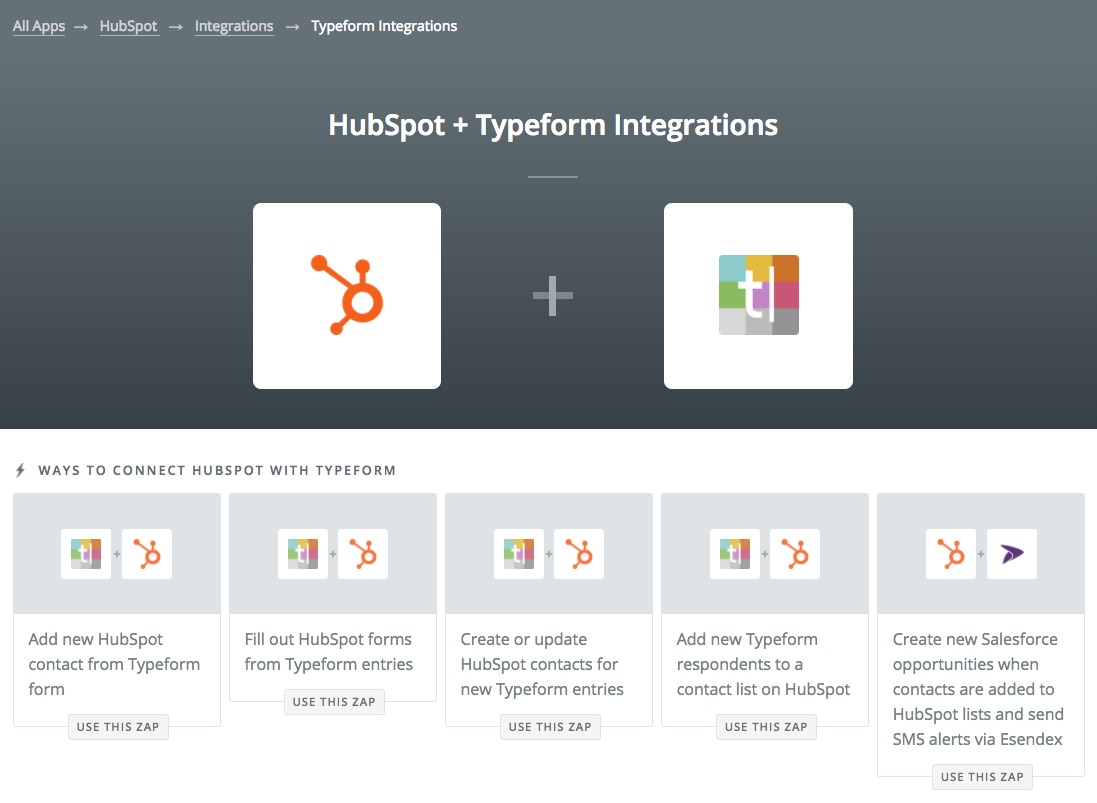
Zapier works by setting a trigger and action.
In this case, the trigger would be a new form fill.
The action would by updating that contact’s record.
You can also use an intermediary step to filter out results based on other criteria (like if they’re a lead and not a customer).
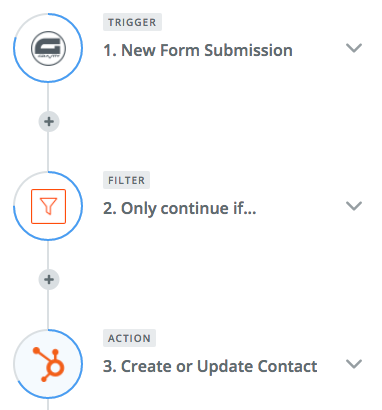
OK, so what’s happening here?
Survey responses are added back to each customer’s database record. They’re essentially segmenting themselves, letting you know what kind of business type or size they fall into.
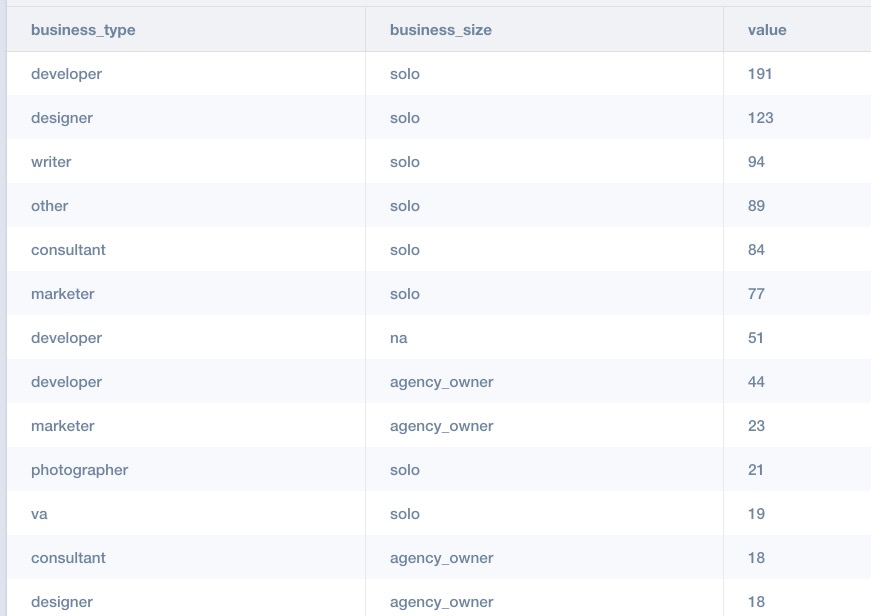
In other words, they’re doing all of the work for you!
Segmenting new leads or customers is tough because you don’t know enough about them.
But it becomes really easy when they literally tell you all the answers.
Now, you’re going to build out automated sequences based on this information.
So all of the people that match “solo” + “developers” will receive completely different messages and offers than the “agency owner” + “designer.”
4. Link Clicks
I can already hear a few objections to the last tip.
“What if you can’t get enough people to answer those surveys?”
No problem! Here’s another trick I like to use.
Again, you’re going to need a marketing automation tool to help you organize everything.
There are so many options here now. HubSpot, Drip, ActiveCampaign, ConvertKit, InfusionSoft: they’re all good.
Many times, you try to get someone to answer a survey, but they won’t.
To make matters worse, they stop responding to a lot of your emails and other messages.
How can you win them back?
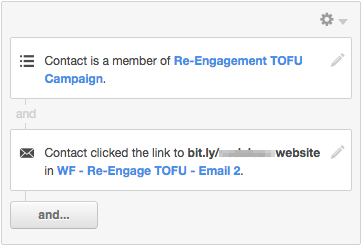
You need to test a few options. You can start by sending out an email with various links, for example.
Each link might have a different value proposition.
So one might be related to a “website,” while another is “SEO.”
Then, you track which ones they click.
If they click “website” and not the other ones, you now know what they’re most interested in next time they visit your site.
Again: We’re not just talking about personalizing emails, here.
That stuff is helpful. But ultimately, the main objective is to personal your website.
The problem is that you can’t do that until you know more about what makes each person tick.
Although, by now, if you follow these first few steps, you should be getting a whole lot closer.
5. Ad Campaign Interaction
Most people won’t buy something the first time they hit your site.
A recent Unbounce study found that somewhere between ~2-6% of people who hit a landing page might purchase.
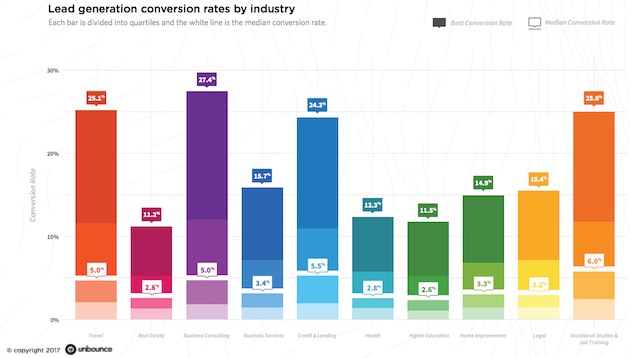
Unfortunately, that means the vast majority of your site visitors are probably going to leave without giving you anything.
Hopefully, you did get one thing from them before they left.
Remarketing or retargeting campaigns can read that little browser cookie and automate ad campaigns to past visitors.
Once again, though, you don’t want to stop there.
You also want to be able to track how people respond to those ads.
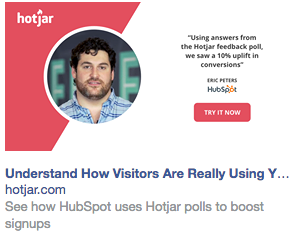
Let’s say you visit Hotjar, but leave without signing up. Now, they’re going to retarget you on Facebook with this case study ad:
Nice, right?
Ultimately, though, they want to see if you click that case study and signup.
They can see which value propositions worked best. Hotjar has like five tools in one.
They want to see which one of those tools piqued your interest the most.
Then, following our theme here, they can use a tool like AdEspresso’s data sync to create a two-way connection between your retargeting campaigns and customer database.
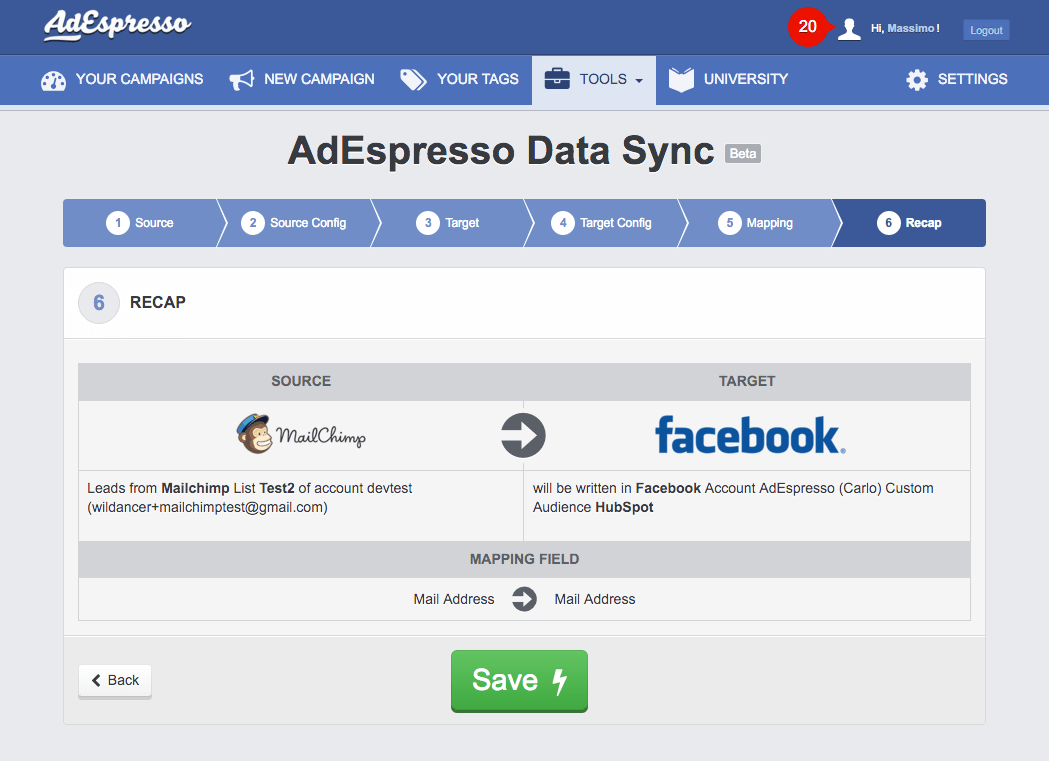
Once the connection is created, your contact records will be tagged, filtered, and updates with the appropriate data.
And here’s where things get fun.
6. Tag and Filter Results
Website personalization techniques need to be triggered.
They need to have some data source telling them how or what to personalize page content with.
So far, we’ve been collecting tons of data points.
Now, it’s time to start using them.
Your marketing automation tool should be recording all of these interactions and updating records accordingly.
That’s typically done through a combination of events, actions, tags, or conditions. Here’s what that looks like inside ConvertKit:

‘Conditions’ are like IF/THEN statements.
They say, “If this happens, then do this.”
First, you start by assigning the criteria that needs to be met. That might include specific page views and a number of site visits, like this Drift example:
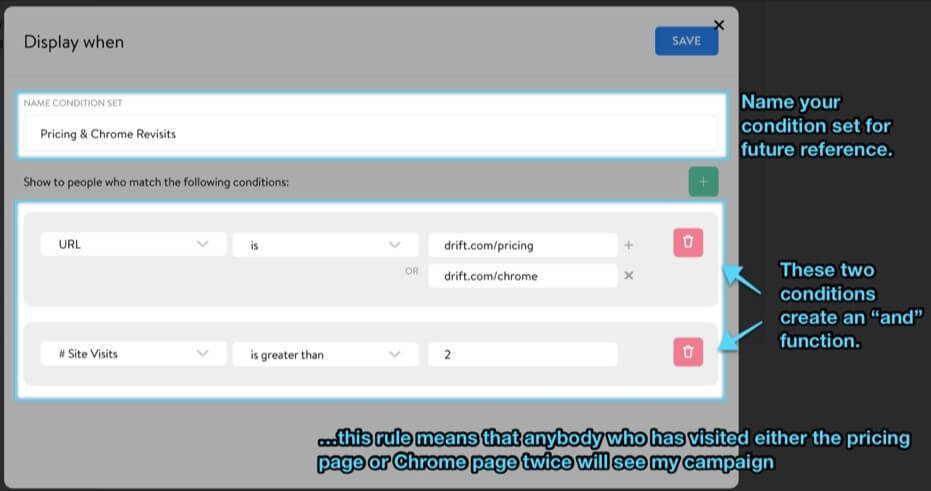
The “then” part is what you do with the information. We’re getting really close to that part.
7. Smart Lists
“Smart lists” work with similar conditions.
You can set criteria that dictates if someone can join the list or not.
Think of it like segmentation.
If someone visits your Pricing page, for example, there’s a pretty good chance they’re interested in purchasing your product.

What makes these lists “smart,” though, is that they update constantly in the background.
So these lists will add people or kick them off certain lists based on all of their interactions.
Relate this back to your marketing funnel.
- If someone visits your site for the first time, add them to a list to receive retargeting ads
- If they click on the ad and download an ebook, remove them from the first list and add them to a new lead list
- If they sign up for a free trial of your software, remove them from all other lists and add them to the free trial one
Make sense so far?
Hopefully, because ultimately these lists will be used to power website personalization.
8. Location data
Cara Harshman, former head of content at Optimizely, announced at the Call to Action Conference that they saw over a 117% lift in people signing up for an account based solely on their homepage personalization.
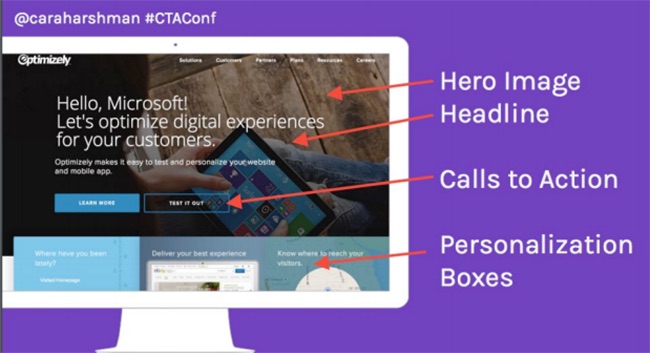
How did they do this?
First, they collected data!
They identified key accounts, like Microsoft or Target, to go after. Then, they used a database to help trigger the appropriate site messaging.
Optimizely has 25 different audiences pre-created, using everything from demographic data and previous behavior.
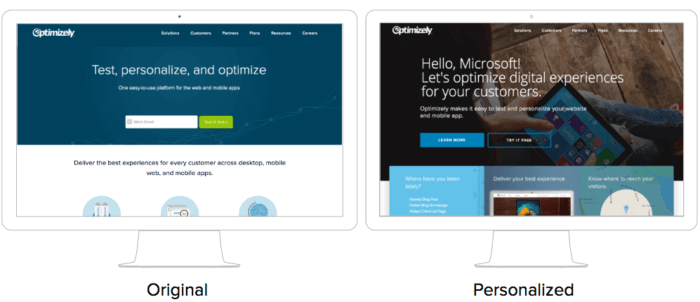
If they don’t have your personal data already, they’ll use other criteria.
For example, visit their site in the morning and you’ll likely get a warm cup of coffee:

In this case, they’re looking at location to help personalize what’s appearing.
Optimizely will also use location to showcase different products.
If you’re in a warm climate, you’ll see warm stuff. If you’re in a cold one, you’ll see more jackets and boots.
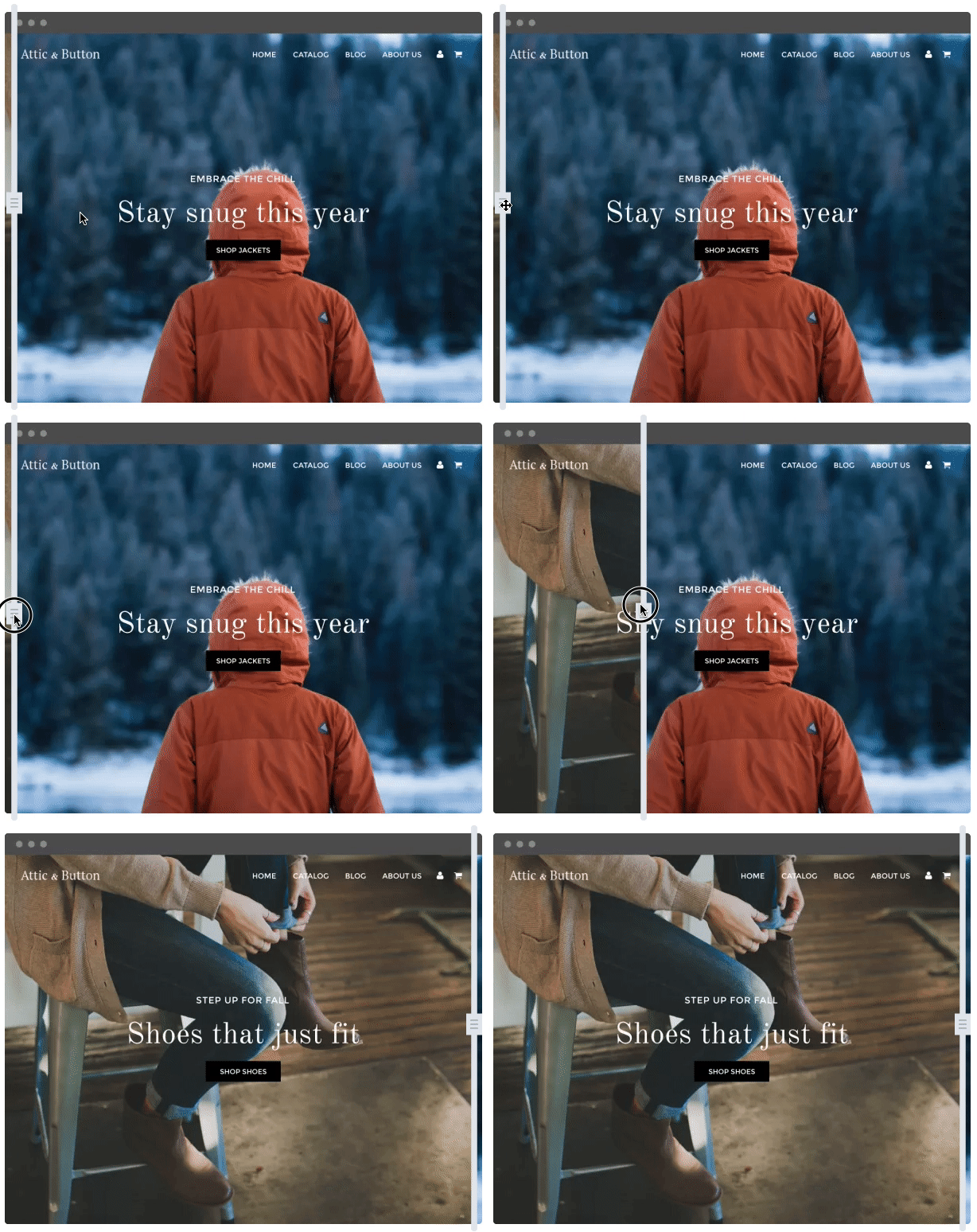
Optimizely goes to such extensive personalization lengths because they’re one of the leading providers of the technology.
But they’re not the only one.
9. Dynamic content blocks
Most websites today run on content management systems (CMS).
HubSpot’s calls their offering a “content optimization system.”
The difference?
They have site personalization baked into the process.
Their toolset already includes a full CRM and marketing automation suite. That makes it easy to create ‘smart content’ that references the data they already have:
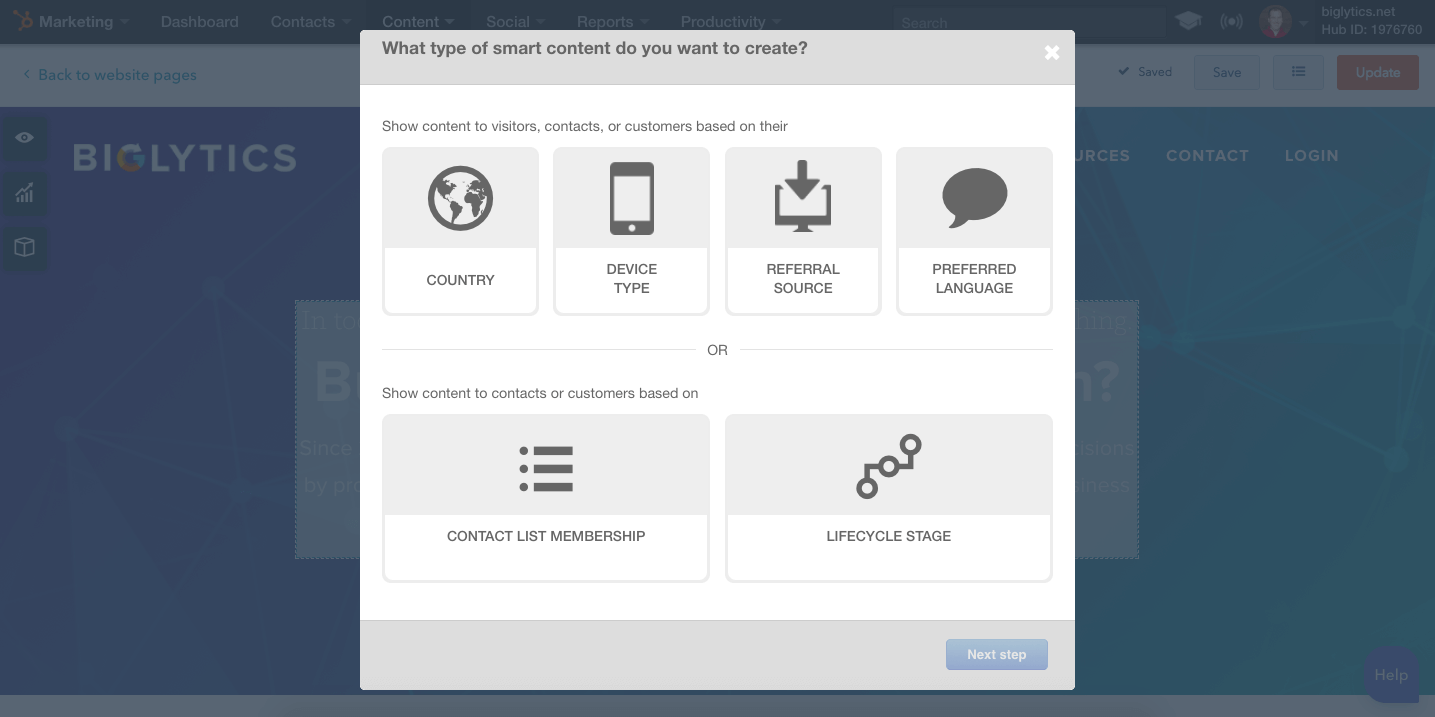
The first few, including country or device type, are helpful when you have limited data.
However, the real power comes down below with contact list membership or lifecycle stage.
This brings us back to the smart lists from earlier.
If someone is on a specific contact list, they’ll receive a different experience from everyone else.
And using this combination of ‘smart’ features can literally automate your entire website personalization strategy across everyone who visits.
HubSpot’s toolset also allows you to customize just calls to action if you want.
That way, you don’t have to overhaul your site. You can simply replace content blocks, like you would with a banner ad.
But HubSpot will reference their database to determine what to show someone, and when.
10. Referral source
There’s one final tip if you’re still stuck or without these high-priced tools.
You can use referral source to segment your marketing funnel.
For example, someone visiting your site based on a PPC ad will see something different than another who came from social media.
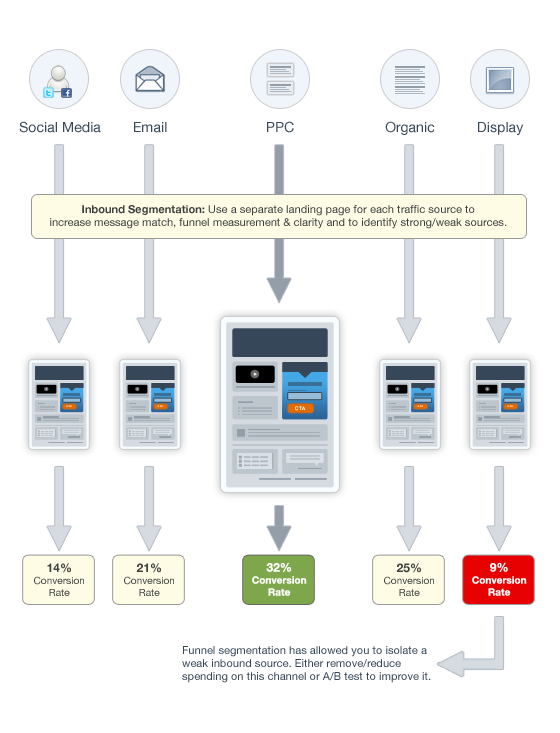
RightMessage is a new tool that can help you personalize pages based on referral source.
So you can create a single landing page design, for instance, but customize all of the content based on if someone is visiting from a partner website, email message, or it’s their very first time to your site.
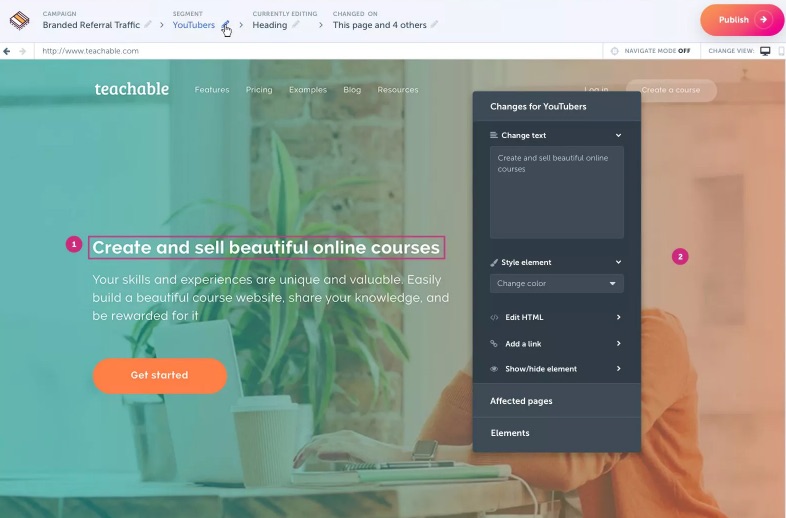
The tool comes from Brennan Dunn, who was able to use its content personalization techniques to increase sales on one page by 70%.

Not so fast, though.
Before Brennan was able to see those awesome results, they had to put together 81 different variations!
How?
By going through a lot of the same steps in this article!
He used detailed survey responses to pinpoint what his customers needed.

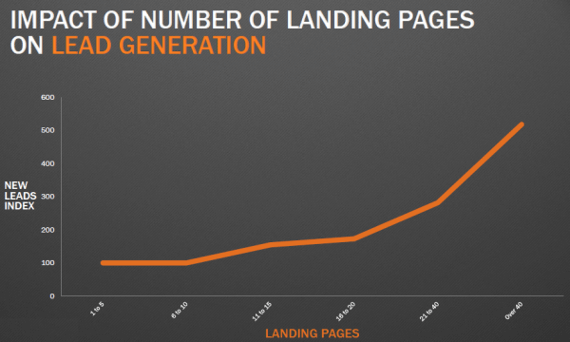
Studies show that more landing pages tend to equal more conversions. However, that doesn’t just mean more offers. It also means more relevant ones. It means more variations on the same pages you’re already using.
Think about your own user flow for a minute.
How do people go from one step the next?
When you start plotting it all out, you’ll see drastically different end points along each step:
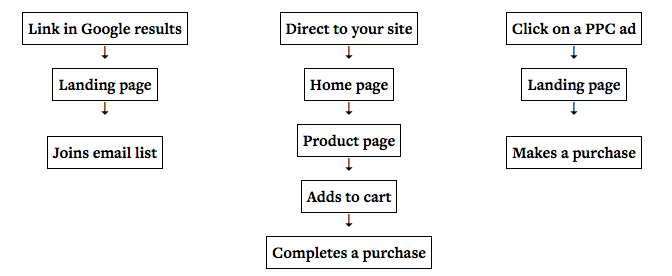
PPC traffic tends to convert well because people are typing in exactly what they’re looking for.
They have intent. That means they should receive a landing page offer, most likely.
But someone who arrives to a blog post from Google?
They’re just starting to get a lay of the land.
Say you Google “content marketing,” for example.
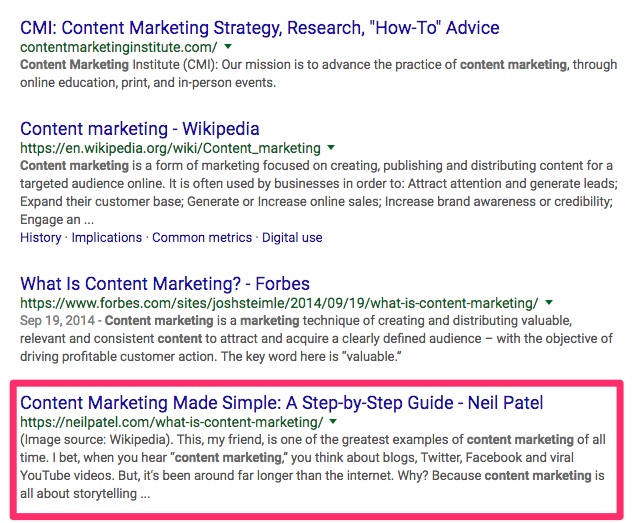
That’s a pretty generic search query. Chances are, you’re just looking for information at this stage.
So instead of a product offer, your next step is probably to learn more information about the website you’re currently on:
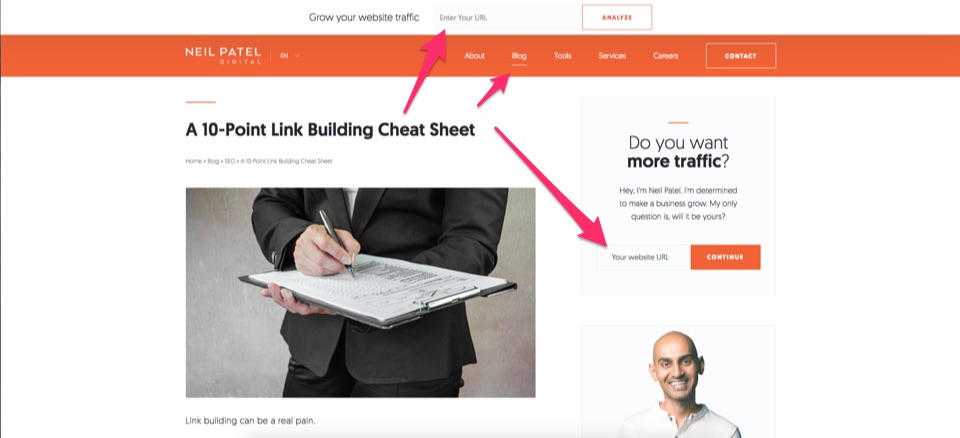
Why are we talking about this?
Because it shows that someone’s referral source can often clue you into what they want.
Want more tips? I give some in this video:
Conclusion
Personalization is one of the leading trends in marketing.
Almost everyone agrees that it’s important. And almost every study shows positive results.
Why don’t more website look like Amazon’s then?
Because implementing personalization is much easier than it looks.
The tools are out there. Sure, many can get pricey when you’re on big plans.
But the technology exists and is affordable to most legitimate businesses.
The problem is that most companies don’t collect enough useful data points about each customer.
They gather demographic data, like household income. But not key data, like “what are they looking for on my site?”
Surveys can help. However, you’ll need enough people on your list, first.
Instead, start relying on more behavior data.
People are literally already telling you exactly what they want. Their clicks and actions are out there in the open.
You just need to know where to look to find it.
What’s your favorite example of website personalization in action?
About the Author: Neil Patel is the cofounder of Neil Patel Digital.

from The Kissmetrics Marketing Blog http://ift.tt/2E3LpzP

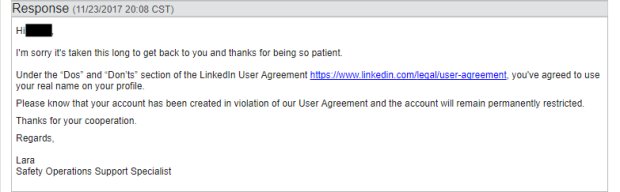
 Since the start the web anonymity has been quite a hot controversy in social media world.