To be fair, no AI tool is perfect, as technology isn’t there yet.
And to give you perspective, the AI wrote this post, and then I had to modify it and add specific sections and steps.
When I looked back and did an analysis, AI wrote roughly 25% of this post.
That’s not too bad. Sure, I had to write 75%, but the hardest part about writing isn’t putting words on a paper, it’s coming up with the ideas and the overall format.
So today, I am going to show you how to write a blog post using AI…keep in mind, over time it will get better as technology improves.
But first,here’ssomething you should know…
Duplicates and AI Content Writing
Google doesn’t penalize for duplicate content, and even if they did, this AI tool makes 100% unique content for you.
So, you won’t have duplicative or plagiarism issues.
It’s not just mixing words around. It is trying to understand what you are trying to write your article on, do research, and come up with words that encompass everything you are trying to get across.
If you are looking to get more insight about your audience, AI for PPC ad writing could help you personalize the ad copy and SEO to determine their habits and motivations.
Search pros are using AI-powered SEO solutions today to accomplish more and give them an edge, pushing their efficiency beyond their competitors.
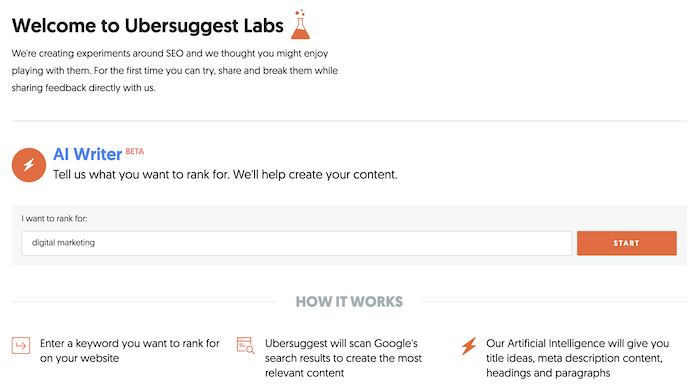
First, enter in the keyword you want an article on. For this example, I chose the term “digital marketing” as my blog is on digital marketing.
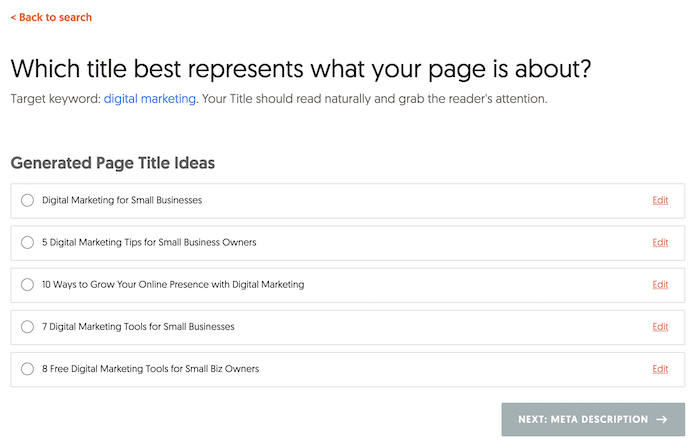
Then you will want to select a title from the list provided. You don’t always have to use it at the very end, but a lot of the titles are based on what people are searching for.
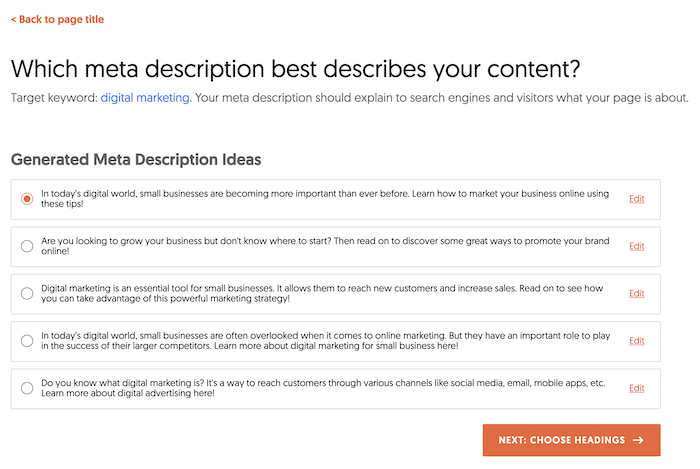
Next, you will want to choose a meta description.
Similar to the above, meta description is also based on keywords that are popular from a traffic perspective.
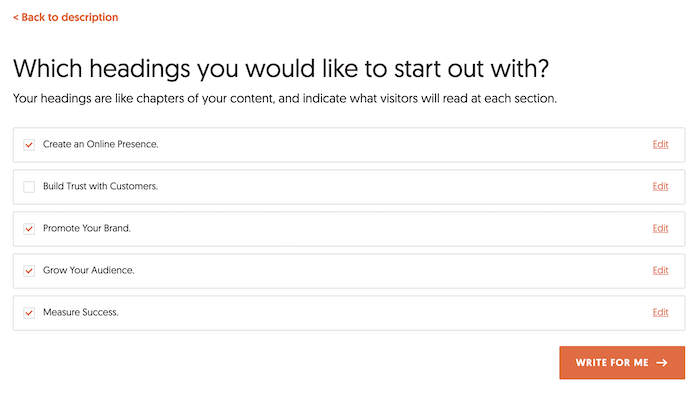
After you select your meta description, you will want to select a few headings.
Keep in mind headings are like book chapters. Pick the ones that work the best, and again, keep in mind you can always adjust the text later on.
The last step is that Ubersuggest will take all of the data and spit out content for you.
By no means is the content perfect, and I wouldn’t recommend publishing it as is or any AI content written by any tool for that matter.
Instead, use it as a starting ground.
How you modify articles will give you a unique voice to better connect with your audience.
Modifying Articles With The Ubersuggest AI Writer
While the AI tool won’t always be contextually accurate, most of the time, it is.
More so, the way you make the AI piece amazing is by getting more detailed.
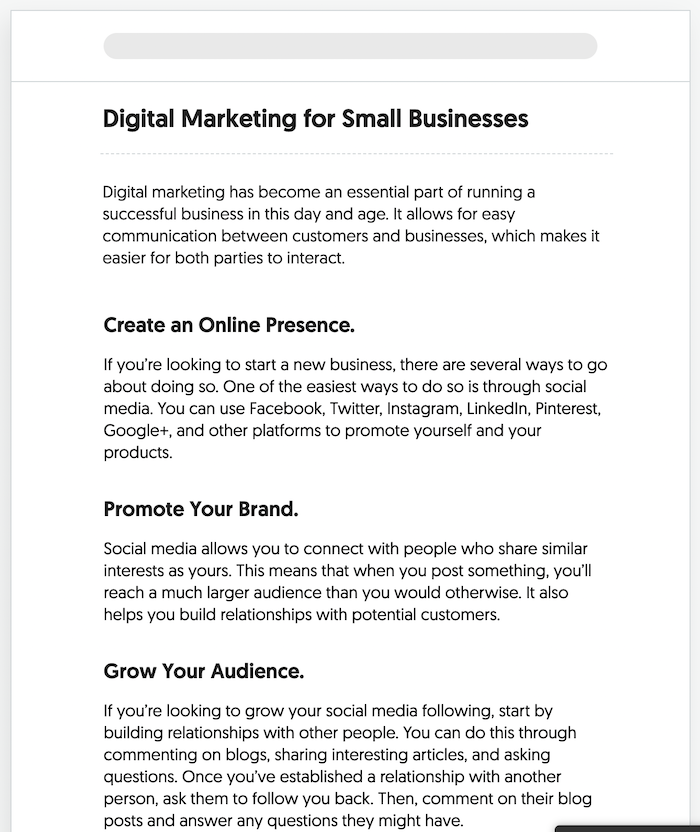
So, for example, in the digital marketing article above, in the “create an online presence” section, I would go in-depth on Facebook, Twitter, LinkedIn, and Pinterest on how you can use them for marketing.
As for Google+, it no longer exists, so I would delete that part and expand the other platforms and give step-by-step instructions on how to leverage them.
I would also include screenshots, so each step is clear.
Under the “promote your brand” section, I would discuss ads and other ways to promote your brand, such as running promotions, sales during holidays, or even doing webinars.
I would give examples of other successful ones that businesses have run and give examples of failed campaigns that have been run and break down what you can learn from them.
The “grow your audience” section already talks about what to do if you have no followers. They are all good tips that the AI tool wrote, but the tips are too surface-level. I would dive deep into each one. Get granular in your approach to growing your audience through engaging with other accounts and potential customers online. Email pitches can even help behind the scenes when convincing brands to collaborate with you to promote your brand.[
And the measuring success section was cut off from the above screenshot, but it mentions Google Analytics. I would go more in-depth on how to set up goals in Google Analytics and tie in revenue. Remember, GA4 is going to be the only game in town in 2023, so you want to make a mention of that and possibly go into how to do so there.
Frequently Asked Questions
What is AI-generated content?
To keep it simple, AI-generated content is created by artificial intelligence, performing writing tasks and research faster than humans. The majority of AI systems are capable of carrying out tasks that often call for human intelligence, decision-making, reasoning, or learning. Through “natural language generation (NLG),” AI is able to produce written narratives as part of the content marketing process. With this power, it may create business reports, forecast consumer behavior, plan content, and provide individualized product recommendations.
How do you use Ubersuggest to create AI content?
Once you open the AI tool, follow these steps:
1. Enter the keyword you want an article on.
2. Choose a meta description.
3. Select the headings that will flow best for the article.
4. Wait for the AI content generator to populate the content.
Is all AI content created equal?
AI content is comparable to human capabilities, but there are still holes to fill. Even if you aren’t looking for an entire article to be written via AI, the paragraph rewriting functionality of AI tools is often offered for free, but there are paid plans. Depending on the tool you use (paid or free), you’ll have varying features like text predictions, blog outlines, and more.
What kind of copy can AI create?
AI content writing is seeing advancement with easily generated, high-quality copy. Many tools offer at least blog, marketing, and sales copy. If you’re putting together a website, you can have your landing page written in seconds. These features mainly depend on your preference input, and it outputs suggestions, giving you extra writing assistance.
Do AI content generators check for plagiarism?
It takes deep learning to produce results with accuracy, and plagiarism detection in AI content generators is still evolving. The fact that AI-generated material isn’t entirely original is a major disadvantage from a content marketing standpoint. The copy may pass a plagiarism checker but lack original research, insights, or facts on the topic.
Conclusion
The Ubersuggest AI tool isn’t meant to replace humans or for it to perfectly write your content for you.
It’s meant to give you a start.
You have experienced writer’s block, and we all hate it. The tool solves that part plus it gives you a head start.
It not only gives you title and meta description ideas, but it writes some of the content for you as well as gives you popular headings based on keyword search volume.
All you have to do is adjust and fill in the rest.
We all know the foundation of e-commerce SEO is keyword research.
Over half of shoppers surveyed in a global retail study say they use Google to research purchases they plan to make online.
This is why SEO is your golden ticket to increasing organic visibility.
How?
Think about it: Before you create your site’s content, you need to know what terms your audience is using to search for products like yours.
How will you solve their problems without knowing the keywords behind their search intent?
You have to build your content with search engines and your users in mind.
The sooner you understand how SEO is changing and adapt your strategies, the sooner you’ll see ROI from e-commerce SEO.
Isn’t it impressive how far SEO has progressed?
Jump on the SEO train with me and I’ll show you why it’s important.
Why Is E-commerce SEO So Important?
You’re trying to get new customers to have all eyes on you.
You can’t win their attention if search engines can’t easily find you.
Your site is basically the secret menu at Starbucks if you don’t invest in keyword research.
That’s why it should be the critical first step in your e-commerce SEO campaign.
One of two things will happen if you don’t get SEO for e-commerce right:
You won’t rank on page one—or near the top—because your target keywords are too difficult.
The keywords you choose won’t drive in the traffic you’re aiming for or align with customers’ search intent.
However, getting your potential customers’ attention can be expensive.
For example, the average cost per click for the apparel industry is about 89 cents. The average cost per action is right below $10 when you break down WordStream’s results. Cost per action is a pricing model where payment is contingent on a qualified specific action, like a sale or submitted form.
While cost per click generates fast, profitable sales, you could spend thousands reeling in new customers.
By using SEO for e-commerce, you’re gaining free organic traffic by getting your site to show up in the SERPs.
But there are some missteps you should avoid if you want to see success.
Common E-commerce SEO Mistakes
What are the user’s needs?
If you keep this question top of mind, you should have a solid e-commerce SEO campaign.
Here is a list of at least three e-commerce SEO mistakes I don’t want you to make:
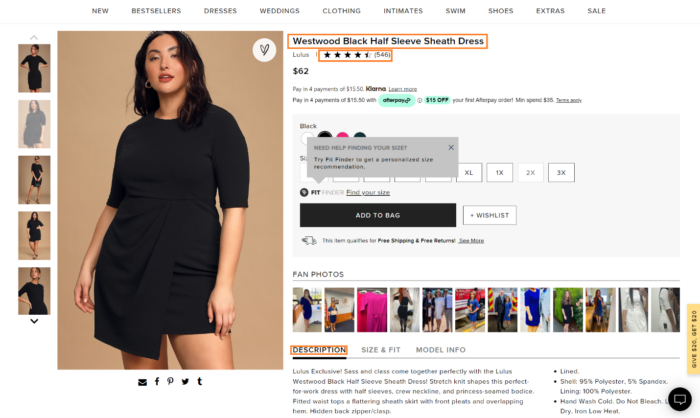
Vague Product Descriptions: This is a place to fit in keywords that make sense for your product. Write a product description so your customer knows what to expect. Even when you’re naming the product, think about a user’s potential search queries. Optimizing your product pages gives them a great chance at a top ranking for items. Product descriptions provide clarity and answer important questions that encourage users to follow through with their cart.
Display of Product Reviews: The beautiful thing about product reviews is they’re customer generated. It’s basically on-screen user-generated content. Reviews share customers’ unique experiences with your product. The page is like a living update, bringing more people to your site. Take advantage of the SEO benefits reviews bring to your e-commerce site. For added benefits, make sure you implement product review schema so your reviews will be even more prominent in Google SERPs.
Non-Interactive Title Tags: Titles are not only a matter of SEO. They should line up with your users’ search intent. Focus on unique phrasing. The formula I like is this: Brand + Model + Item Type = Interactive Title Tag. If you want to see if the titles for your products are unique, use Ubersuggest to double-check.
There are many more benefits to SEO for e-commerce—and mistakes to avoid. I’ve got some examples of e-commerce SEO in action to serve as inspiration for you.
E-commerce SEO Sites That Are Crushing It
Some people say SEO is dead.
Well, I say they’re wrong.
No matter which side of the fence you’re on, you can’t deny the benefits SEO has on e-commerce.
Especially now with social e-commerce, there is big money to be made. Researchers see a trend in e-sales that will go beyond $1.3 trillion by 2025.
SEO for e-commerce done right drives relevant traffic to your social channels and website without spending big on paid ads.
Once you see those qualified leads come in, make sure your strategy is in place to convert them.
We chose these three examples to focus on because:
I’d like to show and tell you who’s crushing e-commerce SEO right now. We chose these three examples because:
They have schema mark-up on the pages which helps create a more enticing SERP result
They have built strong, natural looking backlink profiles
All of these factors are extremely important to help with boosting rankings. Our research shows that show when sites implement SEO strategy and optimized copy, they see a larger keyword universe and higher domain authority. Combine these together and you get high organic traffic numbers.
Let’s take a closer look.
Etsy: Strong E-Commerce SEO Strategy
Etsy is a global online marketplace where brands can buy, sell, trade, and collect one-of-a-kind products. It’s a marketplace where you’ll likely find your new favorite handcrafted items from independent artists and designers.
This is a great environment for a brand to win at e-commerce SEO.
Etsy is making strong strides in SEO marketing right now.
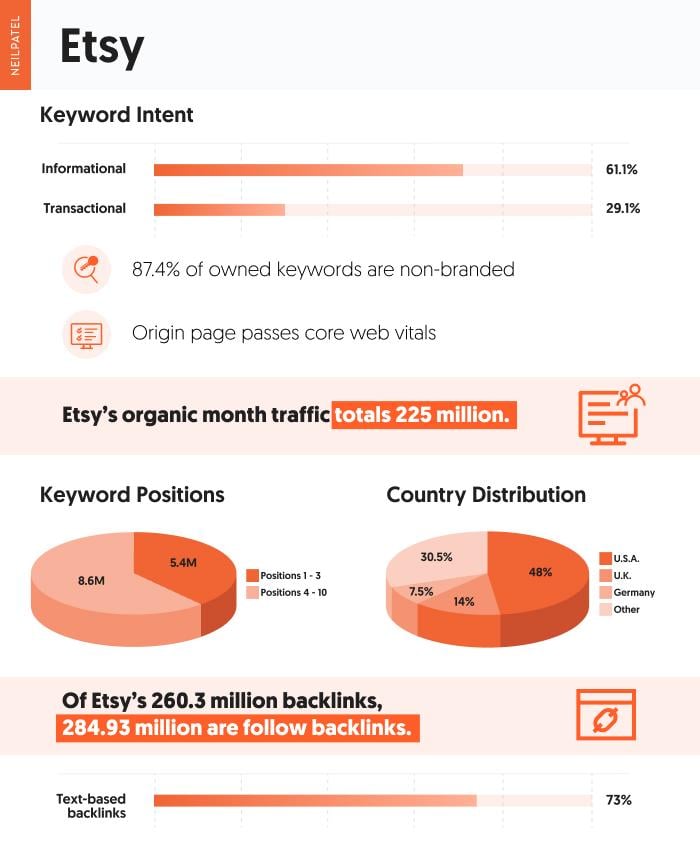
In May 2022, Etsy ranked for over 14 million keywords in position one through ten, including nearly 5.5 million of those in the top three positions.
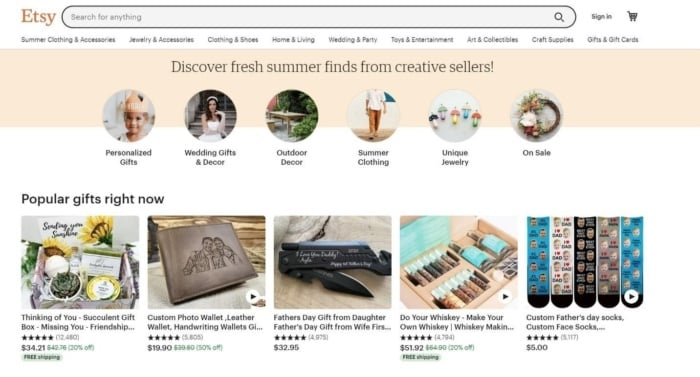
Etsy’s main navigation is intuitive and easy to use. There’s a banner with season-specific, popular items for the summer as well as popular gifts people are purchasing.
Businesses gain brand visibility thanks to how content is laid out over the site. There’s a strong emphasis on discovery. Etsy leans a lot on “keywords by intent,” especially via blog mentions. Their most trafficked blog article features the best Etsy shops, which nets 1,061 visitors and $462 in revenue.
Overall, 61.1% of Etsy’s keywords are informational and 29.9% are transactional. A whopping 87.4% of keywords owned are non-branded. This shows us what users want to know about the brands within Etsy. How they’re educated as an audience matters during their buyer’s journey.
I’d also like to mention a lot of Etsy’s success comes from stellar Core Web Vitals. This is a huge ranking factor in this mobile-first index ranking world. The faster people see their shopping interests during their user experience, the better.
Etsy gets this right all while supporting the shops that rely on them for a degree of brand visibility.
Overstock: A Great Core Web Vitals Example
Overstock is an online retailer that sells home goods at low prices.
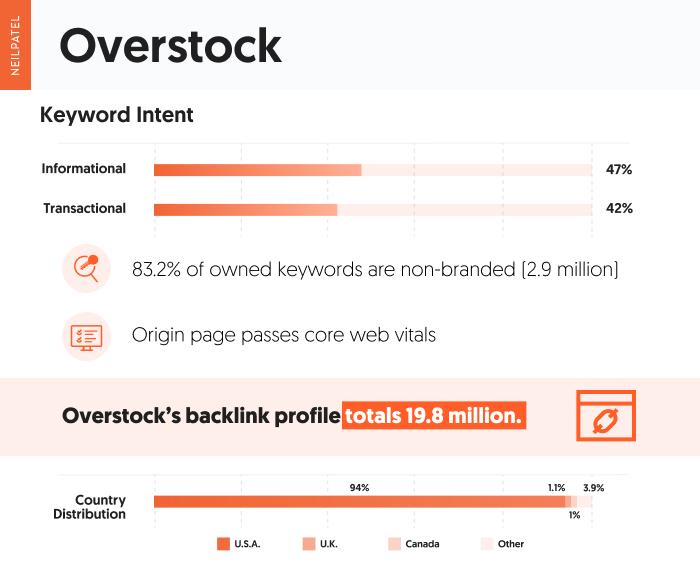
Like Etsy, Overstock has great Core Web Vitals, so user experience with their online database is sharp. They are a tech-driven company, so that’s to be expected.
Based on what users are looking for, they win a lot of traffic for non-branded keywords (83.2%) vs. branded keywords (16.8%). Overstock is capturing users searching for queries that are not associated with their brand. Meaning, they are catching a lot of users looking for a solution their site can solve.
It makes sense why much of the site’s keyword intent funnels in through informational search queries (47% in May 2022). The data shows customers want to be informed before they make their purchases.
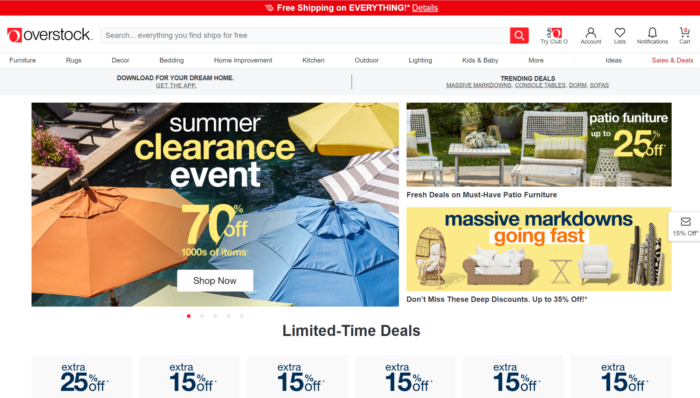
Transactional searches are almost equally as high (42% in May 2022). Think of a popular search like “patio furniture.” The products Overstock offers are essentially what users are searching for.
SEO for e-commerce serves Overstock well by targeting keywords users are looking for, even if it’s not branded. They have mastered aligning keywords with users’ search intent, allowing them to see results with strong performing non-branded terms.
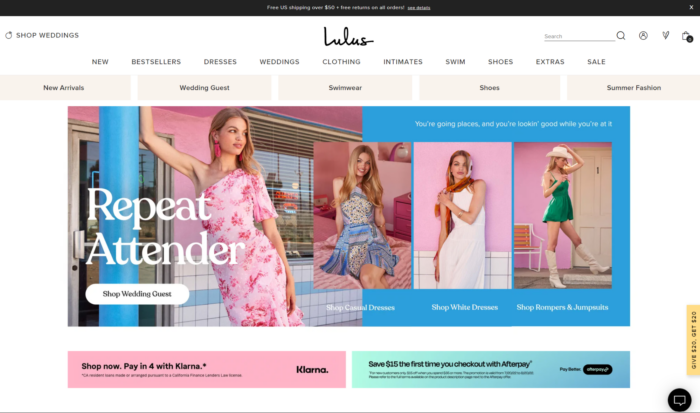
Lulus: How SEO for Ecommerce Helps A Brand
Lulus is a fashion brand with an affordable luxury feel.
They recently upped their Core Web Vitals, helping them rank higher and garner more organic on-page sessions. That’s just one of the ways they’ve upped their game.
Let’s look at how they’re crushing SEO for e-commerce to get these results.
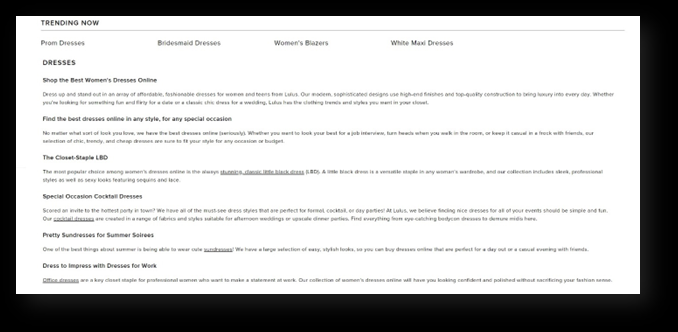
I know it sounds simple, but if you’re searching for a cocktail dress for a company Christmas party, Lulus points you in the right direction on their site.
You’ve got the keywords and directions for your users. Now, they’re bound to trust you and follow through with their cart.
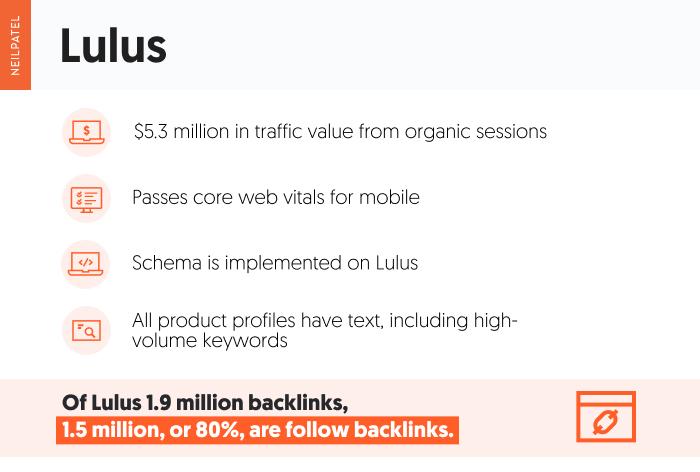
It goes the same way with backlinks. Lulus’ backlinks profile speaks for itself, with well over 19 million referring domains.
Follow links make up 80% of Lulus’ backlinks, signaling to search engines that the site is trustworthy.
Selling amazing products is one thing. Having outside sources vouch for your brand online makes you look even more credible. Think of the SERPs as one big popularity contest, and having other people vouch for you is a big help.
The traffic will come to you as potential leads to convert. They will make secure purchases knowing you have what they need, and they’ll come back to shop for other items they need in the future.
Whether they’re from fashion blogs or influencers, backlinks are e-commerce SEO gold.
This is how Lulus did it.
That’s what SEO for e-commerce does for a brand. It shows your customers you are their solution.
What We Can Learn From E-commerce SEO Done Right?
SEO for e-commerce is a game changer, so spend some time on it.
To play the game right means appearing high on the first page of search engines like Google, Bing, and Yahoo for terms your potential consumers use.
If you know how your audience makes decisions, you can create content that guides them through their purchasing journey.
Yes, having high-quality content and copy matters. It won’t convert to users if your keywords don’t have high-quality search intent, though.
Strategic internal linking—linking to other URLs on the same site—and optimizing product and category pages are some of the hardest parts of e-commerce SEO. However, they’re definitely on my list of e-commerce SEO best practices.
That’s why I’m here. To give you SEO tips that work for you.
Conclusion
Search engines like Google mostly focus on providing users with a valuable experience.
Your website needs to make usability its top priority.
Are you familiar with Google’s Webmaster Guidelines?
It has been around for years (until now), and it broke the dos and don’ts of SEO.
But it was outdated. So, Google replaced it with Search Essentials which gives you a whole new set of requirements if you want to do well with SEO.
They go much more in-depth with what they like and don’t approve of. A lot of it is vague, similar to the old Webmaster Guidelines but they do provide some specifics that will help you out when it comes to SEO.
Here’s what you need to know:
Automated content
They spend a lot of time covering automated content. And it makes sense because there are a lot of tools that provide AI-generated copy.
Heck, we even offer AI content as part of our Ubersuggest tool, and to give you an idea over 20,000 people use it daily.
But I’ve been one of the biggest critics of AI content because no matter what tool you decide to use none of them are good enough to replace a human.
Instead, you can use them to give you a head start, but you need a human to help modify the content to help make it better as well as to add creativity to the piece.
Here’s what Google shared what they don’t like when it comes to AI written content (keep in mind Google also put this in the spam section of Google Essentials):
Text that makes no sense to the reader but contains search keywords
Text translated by an automated tool without human review or curation before publishing
Text generated through automated processes without regard for quality or user experience
Text generated using automated synonymizing, paraphrasing, or obfuscation techniques
Text generated from scraping feeds or search results
Stitching or combining content from different web pages without adding sufficient value
The big takeaway for you here is that Google isn’t saying that you can’t use AI-created content. They have an issue with the quality of AI content.
Just think of it this way if you create AI-written content on a mass scale and don’t have humans editing it, people won’t find it valuable, they will bounce away, and the user metrics won’t be great… which all just means it won’t rank well.
With your content marketing efforts if you want to rank well you really only have a few good options:
Write content yourself
Pay someone to create your content
Use an AI tool to create content, and then use a human to HEAVILY modify it.
If you choose option 3 and still want to rank well, when I say you need someone to “heavily” modify it you’ll have to do a few things:
Expand upon the length – most AI-based content is too short and barely covers the topic. Adding more words will provide more value to the reader.
Add in personal experiences – people love storytelling and reading about personal experiences. It’s how we learn. It’s too hard for an AI writer to add in “personal experiences”. So you will want a human to add that part in.
Make your content fresh – what’s old is old and has probably already been read before. AI writers are pulling from the web and using what’s been written on before to create something that is “new”. But in all honesty, it really isn’t new, it is just regurgitated content. So, you’ll need someone to add in new stats, data, information… anything that makes it stand out from the competition.
Add a dash of personality – in the future AI writers should be able to add personality to the content they create, but I haven’t seen it yet. I’ve literally paid for most if not all the AI writers and tested them out. I’ve yet to see one that adds personality. People connect with humans, not robots, so show your personality through your content.
To even place more emphasis on quality content, Google also recently released the helpful content update, which pretty much breaks downs that you should focus on writing content for users and not Google.
Content types
Reading is becoming less and less popular, especially among the younger generation. According to the American Phycological Association, less than 20% of teens read a book, magazine or newspaper daily. Yet more than 80% say they use social media daily.
And can you guess what type of content social media prefers?
Google senior vice president Prabhakar Raghavan told Fortune:
Something like almost 40% of young people when they’re looking for a place for lunch, they don’t go to Google Maps or Search, they go to TikTok or Instagram.
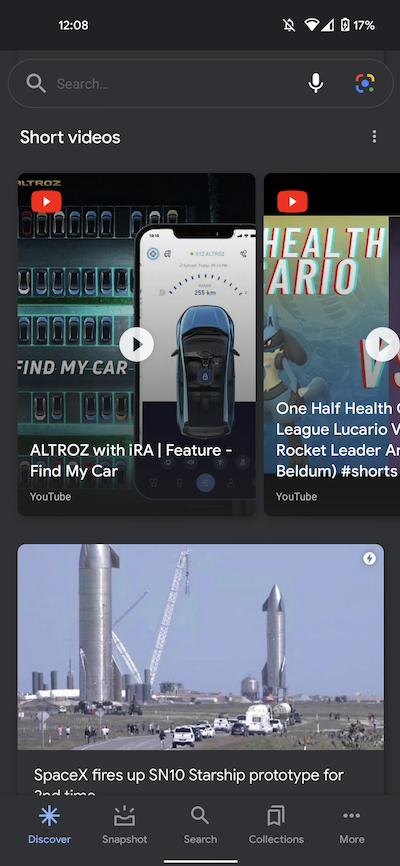
So how is Google adapting? They of course index all forms of content… from videos to podcasts. Plus they released shorts on YouTube which now has over 1.5 billion viewers.
When you are creating different types of content on your website you need to make sure Google can easily classify and index it.
Within Search Essentials, they break down how you can help Google understand the type of content you are creating. This is nothing new, but for them to emphasize this it shows that they understand that the future of SEO isn’t just text-based content and they of course need websites to help them out by using things like schema markup.
This will help ensure that you get the SEO traffic you deserve no matter how Google adjusts its results in the future.
Local SEO
Google mentions a few things that also affect local SEO.
They didn’t really specify that it is for local SEO, but partly is. They don’t want you to keyword stuff and here are some examples of what they don’t want:
Lists of phone numbers without substantial added value
Blocks of text that list cities and regions that a web page is trying to rank for
Repeating the same words or phrases so often that it sounds unnatural.
A lot of companies have multiple locations. Or if they just have one physical location they tend to create pages for each city/region that is close to their location. That way they can get more SEO traffic.
And what happens is they tend to use similar blocks of text with the same keywords on each of those pages, but they just adjust it slightly by adding a new city or region-based content.
Those pages don’t really add value. They are just for search engines so you can capture traffic from a user searching for local results.
I bet you will see Google cracking down more on that in the future.
If you want to create multiple pages for each city that your company serves you need to add more value.
For example, if I were a solar panel installation and service company that serviced Los Angeles, CA I would want to create city-based pages. Because within Los Angeles you have sub-sections such as Hollywood or Beverly Hills.
I would customize each city page and make it very specific. For example, in Beverly Hills, you can’t place solar panels on the roof that are visible to people on the street or your neighbors. And you can’t place Tesla solar roof tiles that just look like normal “roof tiles” as the Beverly Hills design board won’t approve it.
I would even go as far as showing an image of the Tesla solar roof, like the one below so people know what won’t be approved.
Or I could discuss how long it takes to get city approval and what the process is for Beverly Hills as it is different than Hollywood.
There are many more ways to customize your local city pages, but the above are just two simple ways I would make them valuable to both users and Google.
If you want to create multiple city pages think about what value you can provide. Sure you want the traffic and rankings, but to get that put the user first and make sure they are getting more value from you than the competition.
Conclusion
There are a lot of things Google covers in Search Essentials, but most of it is old or nothing that you already didn’t know.
The bigger things are:
They want humans to adjust AI-written content and not just publish it as is because it doesn’t provide much value.
Make sure you help Google understand the content types that you are using. SEO is mainly about text-based content today, but that is going to change as many users (especially the younger audience) prefer image and video-based content.
Google wants to crack down on local SEO spam of users just creating duplicate pages that don’t change much other than they are targeting specific cities or regions.
So what do you think about the Google Search Essentials?
from Neil Patel's Digital Marketing Blog https://ift.tt/Tar41Qt
If you are running a website, there are most likely going to be plenty of images there.
While image-specific SEO is very-well explained inafew detailed guides, let’s try to create a very simple and easily-organized guide to using images properly:
1. Free Images You *Can* Use
First things first: let’s see where you can find free-to-use images online. That’s a popular misconception that you can actually use any image you find online as long as you credit the source.
Mind that you can only re-use images with a certain license:
License
Icon
You Can Re-use
For Commercial Use?
You Can Modify
Credit
Attribution-NoDerivs License
Yes
Yes
No
Yes (Required)
Attribution-NonCommercial-NoDerivs License
No
No
Attribution-ShareAlike License
Yes
Yes
The two popular (and most effective) sources of Creative Commons images you can re-publish are:
Google *Advanced* Image Search (Oddly, there’s no “Usage Rights” option in the sidebar of general image search interface but luckily you can access it using the “Advanced” search option)
2. Image File Names
An image file name is crucial when it comes to ranking an image in Google Image search results. I’ve seen a huge boost of image search traffic each time I pick a good name for my image. Here’s what has always worked like a charm:
key-phrase.jpg
Mind that traditionally, search engines read a hyphen in URLs and file names as a “space” – that doesn’t mean Google won’t understand an underscore, an actual space or other characters there, but a hyphen is the most natural and straightforward way to go with.
3. Image ALT Text and Image Title
That’s another very popular question: what’s the difference between the ALT and the TITLE attributes when it comes to describing an image?
Most basically, here’s the difference:
Image “Alt” Attribute
Image “Title” Attribute
Official rule of use
Describes an image for search agents
Gives *additional* information on what an image is about (when it’s required)
Screen readers (like JAWS or Orca)
“Read” it
Ignore it by default (it is mostly considered redundant*)
Browsers
Google Chrome
Is displayed when images are disabled
Pops up when you hover over an image
FireFox
Is displayed when images are disabled
Safari
Is ignored
Opera
Is displayed when images are disabled
IE
Pops up when you hover over an image if notitle attribute is present
Conclusions:
(Very important!) Use ALT text to describe the image you are using;
Use title if you need to give additional information: do NOT duplicate it with alt text! (*accessibility rules only advise to use TITLE tags for abbreviations, forms, etc, i.e. where an explanation is really necessary);
(If there are many images on one page) Use different alt text throughout the page as it will be displayed as “text” in most browsers (when images are disabled) and in the email newsletter (when remote content is loaded on demand):
4. Image Size and Type
The good old rule has always been to keep your images less than 100K. My own rule of thumb: as long as I don’t sacrifice on the image quality, I make it the minimum size I can.
Google also recommends: “the less, the better”. Here are Google’s recommendations as to file types and compressors:
For very small / simple graphics (e.g. less than 10×10 pixels, or a color palette of less than 3 colors) & for animated images
N/A
BMPs or TIFFs
Don’t use
More great tools to try for any image file type you are using:
WP Smush.it – a WordPress plugin that uses Smush.it API to perform image optimization automatically. It does all essential image optimization tasks: optimizing JPEG compression, converting certain GIFs to indexed PNGs and stripping the un-used colors from indexed images (except for stripping JPEG meta data) automatically.
5. Schema for Images
ImageObject is part of many important schema types out there:
Article (Handled by Yoast)
Product
HowTo
Recipes, etc.
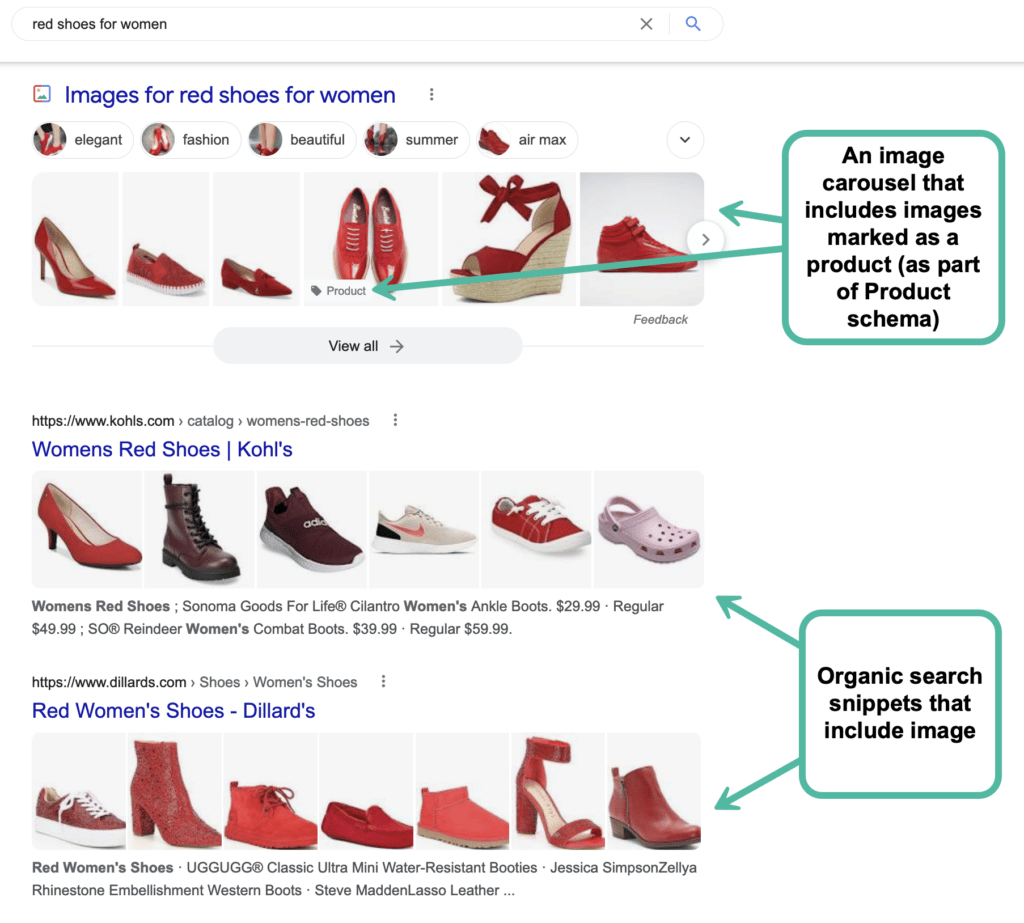
Do your best to include images into your structured data, and you will likely generate visual rich snippets as well as get extra visibility through other search sections:
6. Image Thumbnails in Social Media
An image thumbnail generated with the snippet when someone shares your post on a Facebook or Google Plus wall is crucial when it comes to click-through and further shares.
While Google Plus is generally very smart at marking up your page and finding the best thumbnail to go with the update, Facebook seems to only rely on what you “point” to it. Besides, when using Facebook’s “Like” button, your readers have almost no control over the shared snippet and often an image that gets to your reader’s Facebook wall is absolutely random.
To ensure your beautiful, relevant and eye-catching images make it to your fans’ Facebook streams and get lots of attention, we are forced to use Open Graph Protocol to point Facebook to what needs to be grabbed from your page.
This WordPress Plugin makes integrating Open Graph very easy for WordPress bloggers.
Also, this tool will help you identify how Facebook “sees” your page as well as refresh its cache.
Other “Obvious” Factors
The tips and tables above mostly list image-specific factors of making your images search- and social-friendlier. That doesn’t mean other commonsense practices don’t matter here:
Your images should be surrounded with relevant “text-based” content to rank well in image search results;
Your images should be located at powerful pages (in terms of link juice and on-page optimization).
Have I missed anything? Let’s help make is an actual “all-in-one” guide: add your image SEO tips in the comments!
It’s no secret that every brand is vying to rank higher than competitors in search results and take that top spot.
Build link equity, but don’t obsess over domain authority. Treating domain authority like a vanity metric will not get you its full benefits.
You can’t fake authority. So, let me help you understand where you can compete.
Sound good? Let’s look at what our research taught us about what it takes to increase domain authority.
What Is Domain Authority and Why Is It Important?
You may have heard this term before, but you still don’t know what it means – you just know it’s important.
Well, you’re correct – it is important, especially in regard to your search engine rank.
Domain authority refers to the quality and quantity of backlinks—links from other reliable websites to your website—that your site has. The link being relevant is key because your score is influenced by it.
When Moz created the domain authority metric, the scoring system was made with the ability to compare websites or monitor the ranking strength of the site as it developed over time.
For some brands, they don’t have to try to be authoritative, it seems.
For instance, Dropbox. It has a high domain authority because of the visual content shared between individuals for personal and business use. This then creates unique domain backlinks aside from total backlinks, boosting domain authority for Dropbox.
Why is all this important?
Despite not being a Google ranking factor, one study found a connection between domain authority and SERP ranking.
The results of this study suggest that domain authority may be a useful metric for calculating the potential volume of organic traffic from Google.
If you want to increase your SEO rankings, think about your strategy to increase your domain authority.
Don’t give up if you don’t start seeing results right away, though.
Establishing authority might take some time.
Why Does Domain Authority Take Time to Build?
As you may have noticed, backlinks are quite important for determining domain authority. Not just that, one of the two most significant ranking variables is the number of backlinks.
Like SEO, the best way to increase domain authority is a slow game – depending on your efforts.
You can optimize your site more effectively when you have a better understanding of the keywords for which you are recognized as an authority.
But, it goes beyond keywords.
The larger your backlink profile, the greater your chances to increase domain authority.
A logarithmic scale is used to determine domain authority. As a result, solo stats won’t always affect the score in the same way. The higher the metric, the greater its impact.
So how does this affect how long it takes to increase domain authority?
The answer is it depends.
I know that’s not what you want to hear, but it’s never fun explaining how you won’t be hitting those top-ranking spots immediately.
Even with good content and a good strategy, you won’t be in your desired position due to the site being new, having no content history, or a limited backlink profile.
Achieving a high rank is possible – I never said it wasn’t. It will just be a challenge.
So, as you’re playing catch-up, let me clear the air around some myths so you know what to focus on to increase domain authority.
What Our Data Taught Us About How Long It Takes to Increase Domain Authority
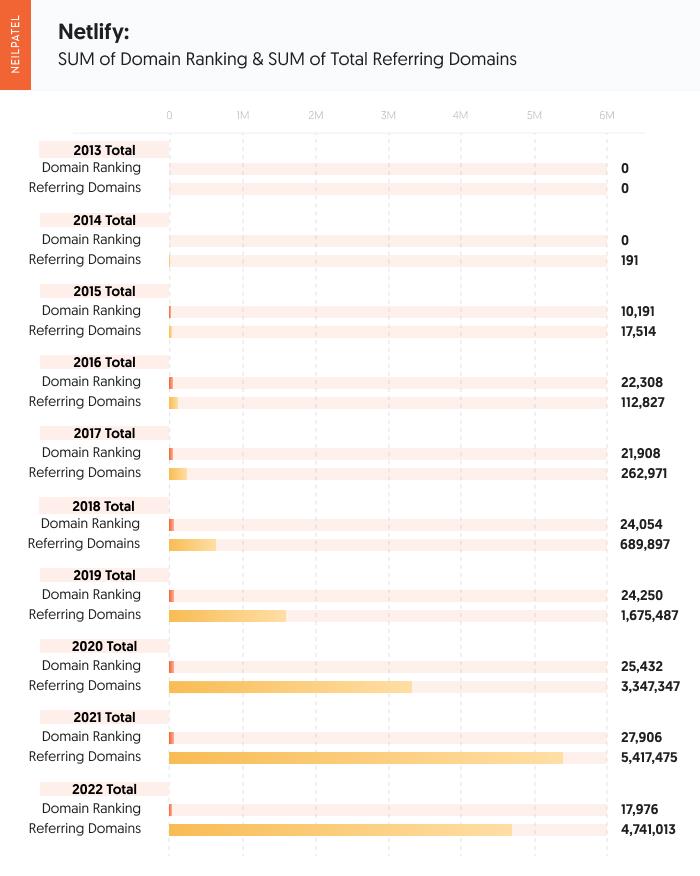
These concepts are nice, but it’s important to see how they play out in action. To figure out the truth, my team and I did a breakdown on a few sites’ domain ratings and referring domains to see what factors contributed to their domain growth.
We followed three sites from July 2013 to July 2022 to measure their domain growth. After balancing this data against their referring domains and backlinks, we got insights to find potential correlations that apply to increasing domain authority.
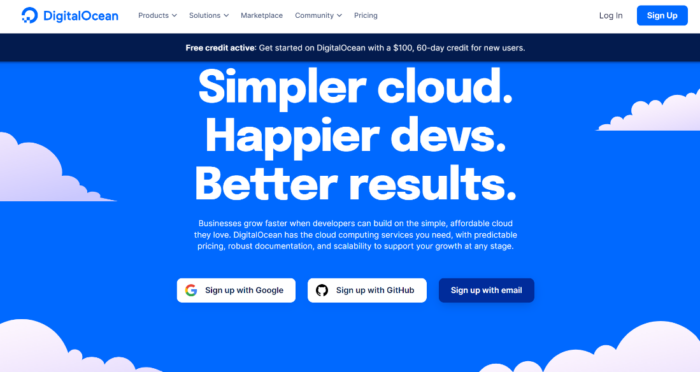
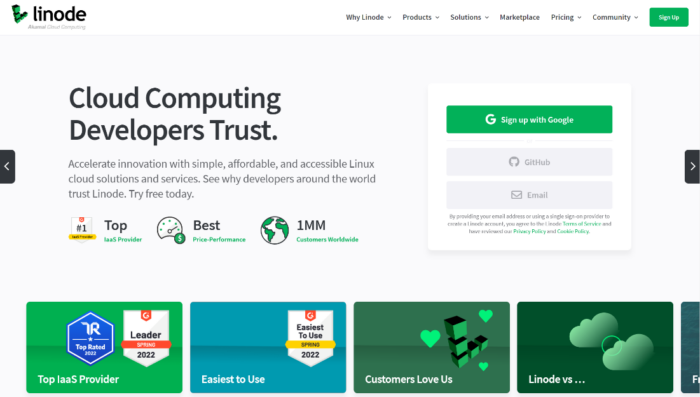
Let’s look at our lessons learned from data insights from Netlify, Digital Ocean, and Linode in the cloud software provider industry.
Netlify: Why Referring Domain Quality Is Important
According to tools like Ahrefs, Netlify didn’t start seeing a jump in domain ratings until March of 2015 where they hit 25 with a total of 34 referring domains. Over the course of 2015, Netlify increased their domain authority to an astounding 71 with 201 referring domains.
By 2017, they started with a domain score of 70 with 443 referring domains and ended 2017 with a 78 and 1,531 total referring domains. So, here we saw it took them about a year to increase 8 points. They more than doubled the links going to the website, which shows by the massive gains in domain rating.
In 2018, they increased from 78 to 83 with 3,283 referring domains. Again, just a little more than doubled their link-building efforts.
In the beginning of 2020, they maintained their 83 and rose 3 positions to an 86 with 14,479 referring domains at the end of 2021.
To date, they now sit at 88 for their domain rating with 24,423 referring domains.
Their backlink profile consists of 90% being from sites with a 0-10 URL distribution. With a high domain authority at 88, many sites in that range will want to link to them, but it makes up the majority of their backlink profile.
Only 4% of their URL distribution comes from sites with a domain authority of 50 or higher. A variety of URLs with the majority being .com. 88% of their links are do-follow which helps pass on link equity.
One thing to note – the scores of your referring domains, while they are important, are not the end all be all. Focus on quality rather than quantity.
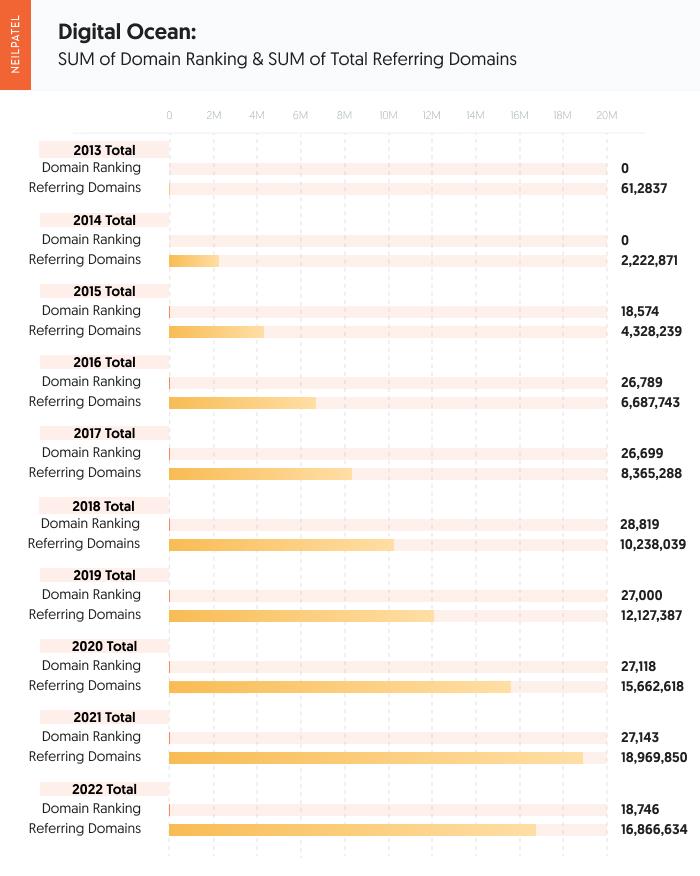
Digital Ocean: The Referring Domain Leader
From our data pull using Ahrefs, Digital Ocean didn’t see a domain rating score until March 31, 2015 when they reached 12,644 referring domains. Digital Ocean’s starting score was 87 and crept up to 89 at the end of 2015 with 17,878 referring domains.
At the beginning of 2016, and at 18,884 referring domains, Digital Ocean was at 89 for its domain rating. Their domain rating was constant through year-end in 2019.
Digital Ocean was still at 89 in 2017 and gained 25.6K referring domains. It isn’t until halfway through 2018 that we see Digital Ocean gain 1 point and hit the 90 mark with 31,690 referring domains.
Digital Ocean stays at a 90 for all of 2019 and most of 2020. In Sept. 2020, they hit 91 with 57,973 referring domains. Almost doubling their referring domains they had when they hit 90 for domain rating, they closed out 2021 with a 91 and 59.5K referring domains.
At the start of 2020, Digital Ocean dropped down to 90 and dropped to 58.8K for referring domains. This indicates that either Digital Ocean was removed from many pages they were linked on or a site they were linked to is no longer active.
They go back and forth from 91 to 90 and back to 91 a few times over the course of 2021 and end 2021 with 72,344 referring domains.
To date, Digital Ocean has maintained its 91 domain rating with an impressive 86,822 referring domains.
Their backlink profile consists of 71% being from sites with a 0-10. With a high domain authority at 91, many sites in that range will want to link to them but it makes up the majority of their backlink profile. Only 4% of their URL distribution comes from sites with a domain authority of 50 or higher. A variety of URLs with the majority being .com. 73% of their links are do-follow which helps pass on link equity.
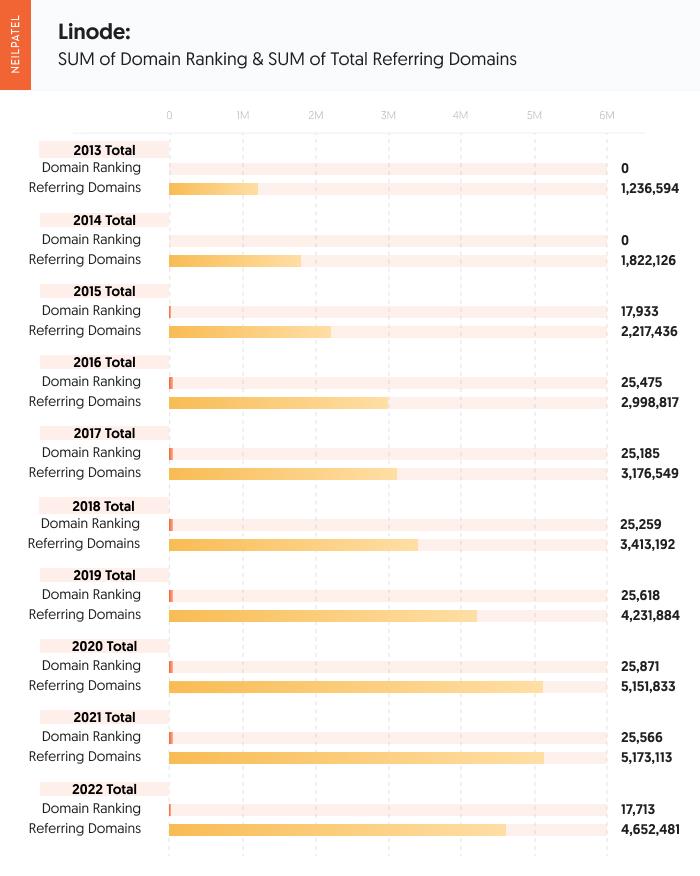
Linode: Evidence On Site Authority
You see a very similar story here with Linode here as well. They did not start having a domain rating of 85 until March 31, 2015, with 6,824 referring domains. Linode ended 2015 with 9,031 referring domains and a domain rating of 85.
Linode started 2016 still at 85. 2016 came to an end, and Linode dropped down to 84 and racked in 9,967 referring domains.
2018 comes and goes and Linode finally hits 85 again late in the year with 11,572 referring domains.
2019 starts at an 85 for domain rating and drops down to 10,915 referring domains. Linode drops to an 84 shortly after and is working to build their referring domains back up. They hit 11,469 referring domains and finally hit an 85 again in early 2019. Their plateau is broken in mid-2019 and they hit an 86 for their domain rating and achieve 14,546 referring domains. By the time 2019 closes out, they land at 86 and 15,957 referring domains.
2020 was fairly constant but Linode sees some changes the following year. 2021 they start off at 86 and slips down to 85 with a year-end of 19,882 referring domains. 2022 starts off by reclaiming 86 for a domain rating and 20,462 referring domains. 2022 to date still stands at 86 and 23,666 referring domains.
Their backlink profile consists of 92% being from sites with a 0 – 10. With a high domain authority at 86, many sites in that range will want to link to them but it makes up the majority of their backlink profile. Only 3% of their URL distribution comes from sites with a domain authority of 50 or higher. A variety of URLs with the majority being .com. 77% of their links are do-follow which helps pass on domain authority.
What Lessons Did We Learn from Data About How to Increase Domain Authority?
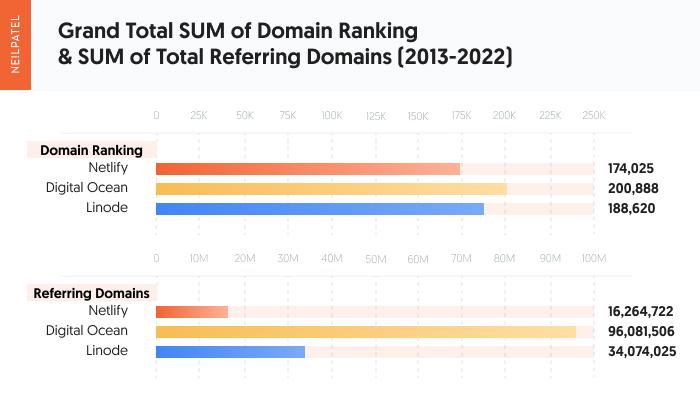
Based on the data from these three websites, it takes about 23,000 – 25,000 referring domains to be in the mid to high 80 scores for domain rating.
The amount of referring domains does seem to correlate with the higher domain rating score.
Digital Ocean has more than triple the amount of referring domains than its competitors. They’ve maintained a 91 as their domain rating score with an impressive 86,822 referring domains. Compared to Digital Ocean, Netlify stands at a score of 88 for their domain rating with 24,423 referring domains and Linode at an 86 with 23,666 referring domains.
Of the three, Linode had a much harder time building and maintaining its domain rating score.
They lost referring domains more frequently and did not have the same percentage of referring domains that had a domain rating score of 50 or higher – meaning average or good. While Netlify and Digital Ocean had 4% of their URL distribution come from sites with a domain authority of 50 or higher, Linode had 3%.
However, the small difference between Netlify, with 24,423 referring domains and Linode’s 23,666 referring domains, with a 2-point difference can be attributed to Netlify having a higher percentage of referring domains with a domain rating of 50 or higher.
What does this mean?
Having more quality sites passing off their authority to Netlify is what has boosted their domain rating score.
In regards to how much time it takes to grow your domain rating, using Netlify as our example, it takes about 34 referring domains to hit a score of 25. It took Netlify 1 year to grow from a 25 to a 71 with 304 referring domains. Still, for Digital Ocean, it took them one year to grow from an 87 to an 89.
This indicates that the closer you get to a domain rating of 100, the harder and longer it takes to grow your authority.
It is easy to go from 0 –10, but once a site hits the higher domain rating scores, it is harder to improve it year over year.
So, aside from what to do and do well, how can you speed things up?
Can You Do Anything to Speed Up the Process?
To increase domain authority means being patient through the process.
But there are a few tips that can help get you to your goal faster.
Try starting with a link audit. This process is how you’ll be able to tell which links pointing to your site are legit and not using weak, black-hat SEO techniques.
There are more items to do after that, though. What if I told you there was a tool that let you learn more about your domain score, where the number of backlinks stand currently, and referring domains?
Try out Ubersuggest.
All backlinks are not created equal, but they all have an impact on SEO results because they are links from other websites to yours.
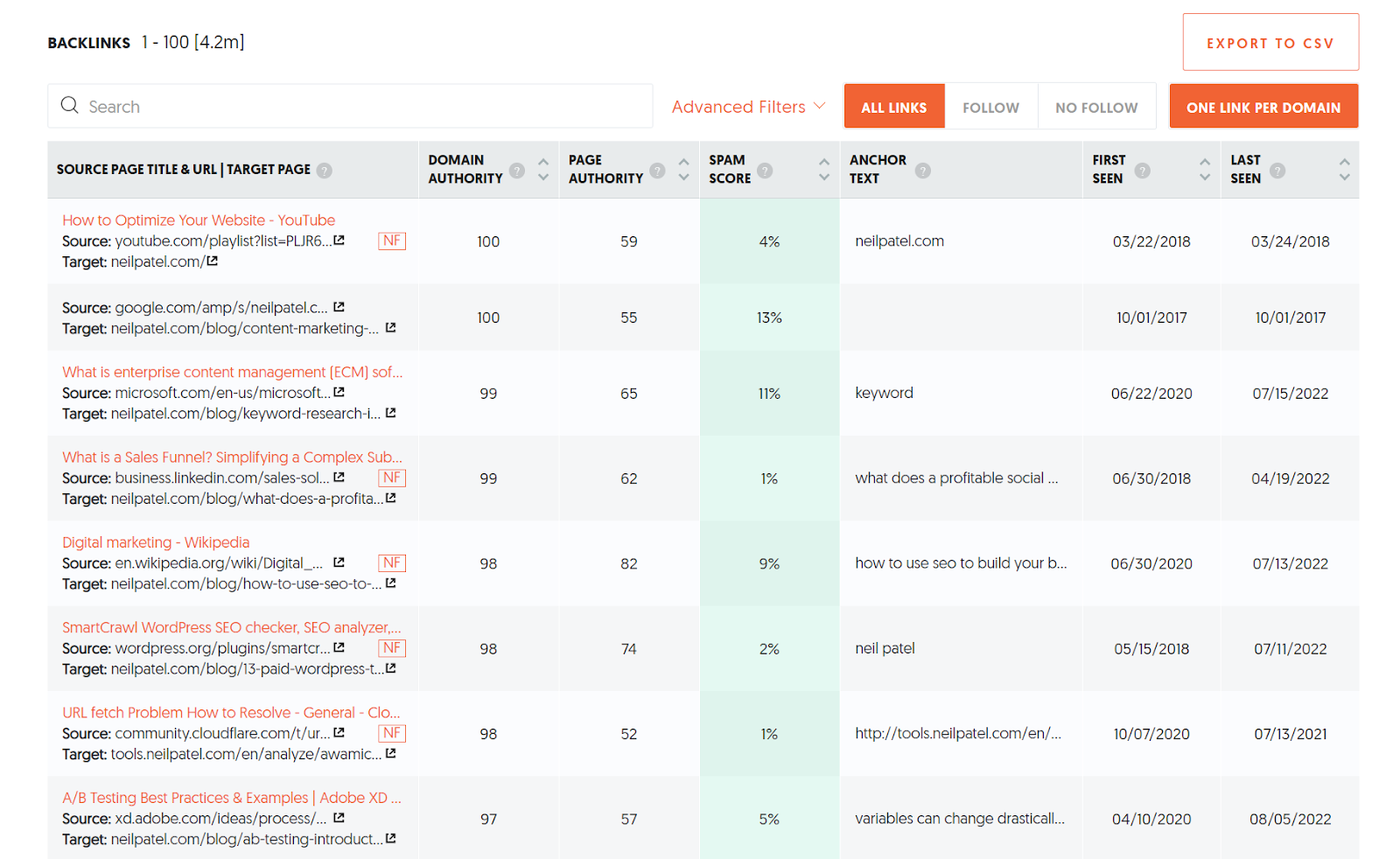
To speed up the process, collect links of high quality. To get started, use the Backlinks feature within Ubersuggest for a free analysis. You will see how backlinks play a role and which websites are linked to your competitors, among other options to speed up an increase in domain authority.
Looking at my site, you can analyze the page authority and domain authority from the source. By taking a look at this information, I can make pivots or double-check anything alarming reports if I see fit.
You can do the same with this tool and see how authoritative your links are.
Common Myths About Domain Authority
Everything about domain authority isn’t always black and white.
However, we can separate some domain authority myths from the facts.
Myth 1: Backlinks really don’t matter that much
This is an interesting one because more links = more traffic leading to better rankings.
Though you will notice even if you have a few quality backlinks, this is better than multiple ineffective ones.
It makes it worth your time when the links are relevant to your niche and known as trusted sources by searchers online.
Myth 2: If a site has a lower domain authority than yours, never get links from them
Domain authority is about all metrics, so getting a link from a page with lower domain authority doesn’t penalize you.
This could be a new site you’re working with. Sites with few links or local links are just fine.
Just because their domain authority is low, don’t worry that they’re going to deliver little to no value or stunt your progress. If they are high-quality sites that also distribute links editorially and connect to other good websites, they are still useful.
Myth 3: Garnering links too quickly could be suspicious
Google zeroes in on spam or spammy-looking links. If they’re triggered by the activity on that page, they’ll take a closer look that could lead them to penalizing the site.
Black hat link building and link buying are among the things that trigger Google that something sketchy is going on.
There’s nothing wrong with speeding up the pace of how many links you gather. After all, it is your goal to increase domain authority, right?
Just make sure the links are coming from good, trusted sites. And never, ever bulk purchase links.
Though growing your domain authority is possible, it will take time – especially considering the tips you decide to use.
Your rating is affected by a variety of elements, and it may be difficult to evaluate them all.
However, once you understand domain authority, it’s worthwhile to monitor and optimize for it.
You might be able to get a tight grip on your total online presence and website health by including this in your SEO toolkit.
As I mentioned, all metrics count and contribute to your domain authority.
Check your follow or nonfollow links. Notice the audience search intent via keywords using Ubersuggest. Review and revise your content marketing strategy. All these aspects contribute to increasing your domain authority.
The quality of the content you have to share can mean more backlinks, and that material will help grow your domain authority.
It’s easier said than done, but I hope all these insights and data helps you reach your preferred domain authority rank.
If you’ve planned how to increase domain authority, have you been successful? Let us know your methods in the comments.
from Neil Patel's Digital Marketing Blog https://ift.tt/h46gQIF
As a savvy internet user, you might think no one clicks on Facebook and Instagram ads.
You’d be wrong.
In 2021, Meta made over $114 billion in revenue from advertising.
Someone’s clicking.
But who, and how do you get them to click on your ads? I’ll show you.
Many marketers who tried Facebook ads, especially in their early days, decided Facebook advertising didn’t work.
Don’t believe them.
I will share everything you need to know about how to create Facebook ads, now known as Meta for Businesses.
If you’re totally new to Facebook, you’ll need to set up Meta Business Suite, then come back to this post for a deep dive into Meta advertising best practices.
In this advanced Meta advertising guide, you’ll learn which businesses are the best fit for the platform and how to run successful campaigns.
We’ll cover the most common mistakes marketers make and the biggest factor in your ads’ success.
How Do Meta Ads Work?
Meta ads work by allowing advertisers to reach users on Facebook and Instagram from one platform.
We can’t talk about Meta ads without also mentioning Facebook ads. In October 2021, Facebook renamed itself Meta. They are working to become a social technology company, not just a social media giant.
When you create ads in Meta Business Suite, you can advertise to both Facebook and Instagram users through boosted posts, videos, photos, Stories, messenger, carousel, slideshows, playable ads, and instant experiences.
Meta ads target users based on their location, demographic, and profile information.
Many of these options are only available from Meta. After creating an ad, you set a budget and bid for each click or thousand impressions that your ad will receive.
If that sounds overwhelming, don’t worry. I’ll explain what all that means.
Who Should Advertise on Facebook (now Meta)?
Many businesses fail at Meta advertising because it’s not a good fit for their audience. So before investing time and money on Meta ads, consider whether your business model is a good fit for Facebook or Instagram.
In the past, Meta ads were more like display ads than search ads — though new versions of ads, like product ads, allow advertisers to sell products directly to users.
Here are a few types of businesses that are likely to succeed with advertising through Meta..
How To Create Meta Ads For Businesses with Low-Friction Conversions
The businesses that are most likely to succeed with Meta ads ask users to sign up, not to buy. You must use a low-friction conversion to be successful.
A visitor to your website wasn’t looking for your product. They clicked your ad on a whim. You will fail if you rely on them to immediately buy something to make your ad ROI positive.
Meta users are fickle and likely to click back to Facebook or Instagram if you ask for a big commitment (purchase) upfront. Instead, stick to simple conversions like signing up for your service, filling out a short lead form, submitting an email address, or converting inside the platform using Instagram shopping or similar.
Even if you sell products, not services, you should consider focusing on an intermediate conversion like a newsletter signup. Then you can upsell later through email marketing or retargeting ads.
Daily deal sites like Groupon, AppSumo, and Fab are good examples of businesses that can succeed with Facebook advertising. After you click one of their ads, they just ask for your email address. They’ll sell you on a deal later.
Business Model with Long Sales Cycle or Small Purchases
Even if you only ask for an email address initially, you’ll need to eventually make money from these users to be profitable.
The best business model that fits Facebook ads earn revenue from its users over time, not all at once. A user may have given you their email, but you’ll need to build more trust before they are likely to buy anything.
You shouldn’t depend on one big purchase. Several smaller purchases are ideal.
Daily deals and subscription sites are great examples of business models that can thrive on Meta. Both have customers whose lifetime value is spread out over six months or more.
At Udemy, they focus on getting users to sign up on their first visit. By aiming to be profitable on ad spend in six months (not one day), they turn Facebook users into long-term customers.
They target a 20 percent payback on ad spend on day one and 100 percent payback in six months. These numbers can serve as a rough guide for your business.
Businesses in fashion, books, and other small purchases also do well on Meta, especially Instagram.
How to Target Meta Ads
The number one mistake most marketers make with Facebook ads is not targeting them correctly.
Facebook’s ad targeting options are unparalleled. You can target by demographics and create custom or lookalike audiences to target users similar to your best customers. You can also use retargeting ads to target users who have interacted with your page, or visited your website.
On Meta, you can directly target users by:
location
age
gender
interests
connections
relationship status
languages
education
workplaces
Each option can be useful, depending on your audience. Most marketers should focus on location, age, gender, and interests.
Location allows you to target users in the country, state, city, or zip code that you service.
Age and gender targeting should be based on your existing customers. If women 25-44 are the bulk of your customers, start targeting them. If they prove to be profitable, you can then expand your targeting.
Interest targeting is the most powerful but misused feature of Facebook ads. When creating an ad, you have two options: broad categories or detailed interests.
Maximizing Investment with Broad Category Targeting
Broad categories include topics like Gardening, Horror Movies, and Consumer Electronics.
Meta also added targets like Engaged (1 year), Expecting Parents, Away from Hometown, and Has Birthday in 1 Week.
Broad interests may seem like an efficient way to reach a large audience. However, these users often cost more and spend less. You’ll also need to install the Meta pixel.
This used to be an ineffective way to reach audiences because it targeted too large of an audience; however, adding the Meta pixel and dynamic ads makes this far more effective.
It is worth testing, but detailed interest targeting is often more effective.
Detailed Targeting: A Powerful Meta Ad Targeting Strategy
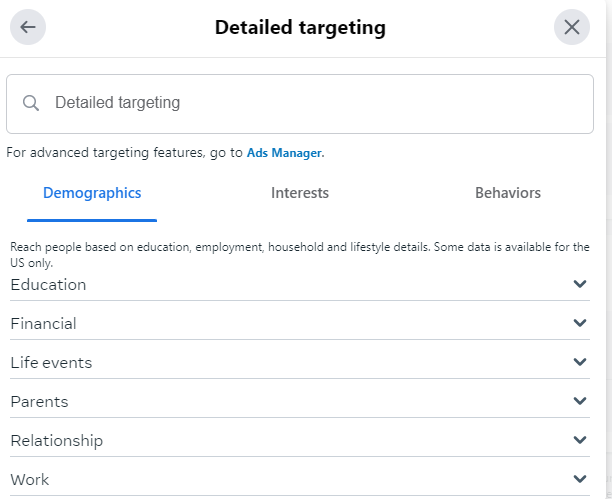
Detailed targeting allows you to target Meta users based on more detailed interests and onsite behaviors.
For example, you can target users based on the following:
Ads they’ve clicked on.
Facebook or Instagram pages they interact with.
Activities across Meta, including things like which device they use or travel preferences.
More detailed demographics.
Speed of their internet connection.
Detailed targeting also allows Meta advertisers to include or exclude specific people using the “or”/”and” targeting.
For example, if you can target users who “are ” college graduates, you can then focus on those that “are ” interested in travel “or” interested in food. This lets you get a lot more detailed about your target audience.
Meta Ads Lookalike Audiences
In addition to targeting users directly, Meta allows you to target a group called Lookalike Audiences.
What are Meta Lookalike Audiences? These are Meta users that are similar to your current users. You’ll need to have Meta Pixel or other custom audience data, like an email list. Then, you can ask Facebook to find similar users.
They are highly customizable — for example, you could create a “new customer” ad, then exclude current customers from seeing your ads.
Retargeting ads allow you to reach customers already familiar with your brand. You can double down by creating dynamic ads that show people items they are likely to be interested in.
For example, you could retarget users who have visited your site, left items in their cart, or clicked on an ad.
To create a retargeting ad, the first step is to install the Meta Pixel. Follow this guide in Meta’s Business Help Center to get started.
Images for Meta Ads
The most important part of your Meta ad is the image. You can write the most brilliant copy in the world, but if your image doesn’t catch a user’s eye, you won’t get any clicks.
Don’t use:
low-quality images
generic stock photography
any images you don’t have the rights to use
Also, don’t steal anything from Google Images. Unless you’re a famous brand, don’t use your logo.
Now that we have the no’s out of the way, how should advertisers find images to use? Buy them, create them yourself, or use ones with a Creative Commons license.
Below you’ll learn which types of images work best and where specifically to find them.
Use Images of People on Your Ads
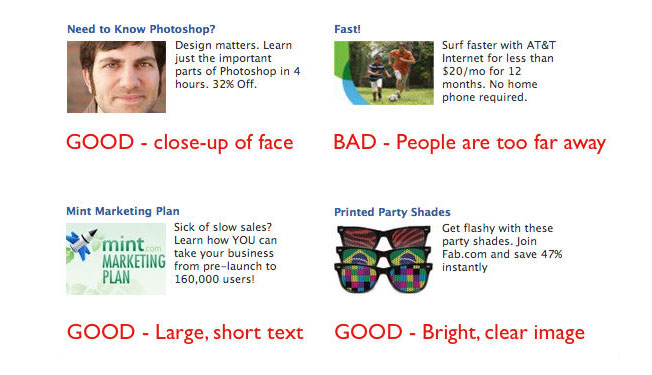
Images of people work best, preferably their faces. Use close-ups of attractive faces that resemble your target audience.
Younger isn’t always better. If you’re targeting retirees, test pictures of people over 60. Using a 25-year-old woman wouldn’t make sense.
Facebook sidebar ad images are small (254 by 133 pixels), while Instagram feed ads should be no wider than 500 pixels. You can check out the specs for other Meta ads here.
Make sure to focus on a person’s face and crop it if necessary. Don’t use a blurry or dark picture.
Use this ad image guide on Facebook to see the size requirements for other ads, like a desktop news feed, a mobile news feed, instant articles, stories, etc.
Advanced tip: Use images of people facing to the right. Users will follow the subject’s line of sight and be more likely to read your ad text.
Aside from models, you can also feature the people behind your business and showcase some of your customers (with their permission, of course.)
The Importance of Typography in Advertising
Clear, readable type can also attract clicks. Bright colors will help your ad stand out.
Just like with text copy, use a question or express a benefit to the user. Treat the text in the image as an extension of your copy.
You can also combine text and images, like this ad for a podcast about Nashville:
Add Humor and Fun Into Your Ads
Crazy or funny pictures definitely attract clicks. See I Can Has Cheezburger, 9GAG, or any popular meme page.
Unfortunately, even with descriptive ad text, these ads don’t always convert well. If you use this type of ad, set a low budget and track the performance closely. You’ll often attract lots of curiosity clicks that won’t convert.
How to Create Images for Meta Ads
You have three options for images to use in your Meta ads: buy them, find ones that are already licensed, or create them yourself.
You can buy stock photography at many sites, including iStockPhoto. There are also sites with free stock photos like Pixabay. Don’t use stock photos that look like stock photos. No generic businessmen or stark white backgrounds, please.
Users recognize stock photos and will ignore them. Instead, find unique photos and give them personality by cropping or editing them and applying filters. You can use Pixlr, an online image editor, for both.
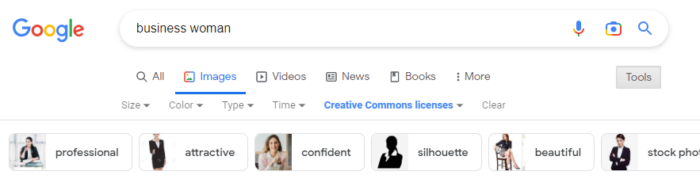
If you don’t have the money to buy photos, search for Creative Commons licensed images using Google Images:
The third option is to create the images yourself. If you’re a graphic designer, this is easy. If you aren’t, you can still create typographic images or use basic image editing to create something original from existing pictures.
Rotate Ads
Each campaign should have at least three ads with the same interest targets. Using a small number of ads will allow you to gather data on each one. For a given campaign, only one to two ads will get a lot of impressions, so don’t bother running too many at once.
After a few days, delete the ads with the lowest click-through rates (CTRs) and keep iterating on the winners to continually increase your CTR.
Aim for 0.1% as a benchmark. You’ll likely start out closer to the average of 0.04%.
Writing Successful Facebook (Now Meta) Ad Copy
After seeing your image, users will (hopefully) read your ad text. Here you can sell them on your product or service and earn their click.
Despite the 40-character headline and 125-character body text limits, we can still use the famous copywriting formula AIDA.
(A)ttention: Draw users into the ad with an attention-grabbing headline.
(I)nterest: Get the user interested in your product by briefly describing the most important benefit of using it.
(D)esire: Create immediate desire for your product with a discount, free trial, or limited-time offer.
(A)ction: End the ad with a call to action.
AIDA is a lot to fit into 165 characters, but it can be done. Write five or ten ads until you’re able to fit a succinct sales pitch into the ad.
Here’s an example for an online programming course:
Become a Web Developer
Learn everything you need to become a web developer from scratch.
Save 65%. Enroll now!
This tells users what they’ll get, why it matters, and why they should care in just a few lines.
Bidding on Meta Ads
Like on any ad network, strategic bidding can mean the difference between profit and a failed test on Meta.
After you create your ad, Meta provides a suggested bid range. When you’re just starting out, set your bid near the low end of this range, so you don’t waste ad spend on an untested ad.
Your CTR will quickly start to dictate the price you’ll need to pay for traffic. If your CTR is high, your suggested bids will decrease.
You’ll need to bid more for each click if your CTR is low. Optimize your ads and targets to continually increase your CTR.
In addition to click volume, your bid will also dictate how much of your target audience you can reach.
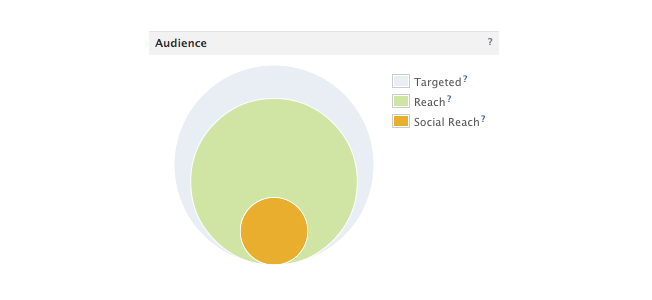
Meta provides a great chart for every campaign showing the size of your target audience and how much of that audience you’ve reached.
Increasing your bid will help your ad reach more of your target audience. If your ad is performing well but reaches less than 75 percent of your target audience, you can increase your bid to get more clicks.
If your audience penetration is high, increasing your budget will increase your ad’s frequency: how many times a targeted user will see it.
Meta also offers automated bidding that uses AI to determine what bids to make. If you use this strategy, make sure to keep a close eye on your budget so you don’t overspend.
Landing Pages for Meta Ads
Getting a click on your Meta ad is only the beginning. You still need the visitor to convert.
Make sure to send traffic to a targeted, high-converting landing page. You know their age, gender, and interests, so deliver a page that solves their problems.
The landing page should also contain the registration form or email submit box that you’ll track as a conversion.
Focus the landing page on this action, not the later sale. If you want visitors to sign up for your newsletter, show them the benefits or offer a free gift for their email.
How to Track Meta Ad Performance
Like PPC ads, you’ll want to track your meta ad performance. The exact metrics that are important to you will vary by goal. For example, ad impressions and clicks are important if your goal is to increase brand awareness. If your goal is to increase your email list, then you’d want more actual form fills.
Here are a few things to keep in mind when tracking Meta ad performance.
Conversion Tracking
To track conversions, you’ll need to install Meta’s pixel. Make sure to track conversions for both specific ads and ad campaigns to get a deeper understanding of what ads are converting. Pay attention to both your ads and your audience—targeting the right audience often makes all the difference.
Performance Tracking
You also need to monitor your performance within Meta Business Suite. The most important metric to track is the click-through rate. Your CTR affects both the number of clicks you’ll receive and the amount you will pay per click.
Ads with a low CTR will stop serving or become more expensive. Ads with a high CTR will generate as many clicks as will fit within your budget. They will also cost less. Keep a close eye on CTR by interests and ads to learn which audiences work best and which ads resonate with them.
Keep in mind: Even the best ad’s performance will decline over time. The smaller your target audience is, the faster this will happen. Usually, you’ll see your traffic start to drop off in 3-10 days.
When this happens, refresh the ads with new images and copy. Duplicate your existing ads, then change the image and ad text.
Do not edit the existing ad. Delete any existing ads not getting clicks. You’ll see the new ads accruing impressions and clicks the next day.
Monitor the images’ performance over time to see which generates the best CTR and maintains their traffic the longest. You can rotate high-performing images back every few weeks until they stop getting clicked at all.
Use A/B Testing in Meta
A/B testing allows you to change variables in your ads, such as the ad copy, images, or audience, to see which strategy performs best. Meta allows you to create A/B tests in Ads Manager, so you won’t even need to use a third-party tool.
Meta Ads FAQs
Does Facebook still have ads since becoming Meta?
Yes, Facebook ads still exist. Using Meta Business Suite (formerly Facebook Business Suite), you can create ads for just Facebook or Facebook and Instagram.
How does Meta (formerly Facebook) target ads?
Meta allows advertisers to target ads based on demographic information, interests, location, and past behaviors. This makes it an ideal platform for advertisers, whether they want to reach very niche audiences or very broad audiences.
What is the Meta Ads Manager?
Meta Ads Manager is a stripped-down version of Meta Business Suite that allows you to create new ads fast. It doesn’t offer as many features, but it may be easier for some users to navigate.
What is the difference between Facebook and Meta ads?
Facebook ads are only on Facebook, while Meta Ads can currently appear on Facebook or Instagram. In 2021, Facebook changed its parent company name to Meta, and changed Facebook Business Suite to Meta Business Suite, where advertisers can manage ads on both platforms.
What are some of the available Meta Ad options?
Posts, images, carousels, boosted posts, Reels, Stories, and more.
Conclusion
Despite the learning curve, Meta advertising can be a great marketing channel for the right business. The most important things to remember are: target specific interests, use eye-catching images, give users a low-friction conversion, and track everything.
After a week or two of learning what works for your business, you’ll be able to generate a steady source of Meta conversions.
What are your best Meta advertising tips? Share them in the comments.
from Neil Patel's Digital Marketing Blog https://ift.tt/UFpJvbR